Are You Using AWS Availability Zones the Right Way? | Savishty
Are You Using AWS Availability Zones the Right Way?
Your application is running smoothly. Your EC2 instances are healthy, your database is responding, and customers can access your platform without any issues.
But what happens if the Availability Zone hosting your application suddenly experiences an outage?
Will your application continue working, or will your entire business go offline?
This is a question many businesses overlook when designing their AWS infrastructure.
One of the biggest advantages of Amazon Web Services (AWS) is its ability to distribute workloads across multiple Availability Zones. However, simply deploying resources in AWS does not automatically make an application highly available.
The real challenge is understanding how Availability Zones work and designing your infrastructure to use them effectively.
Let's explore what AWS Availability Zones are, the mistakes businesses make, and how to build a more resilient cloud environment.
1. What Are AWS Availability Zones?
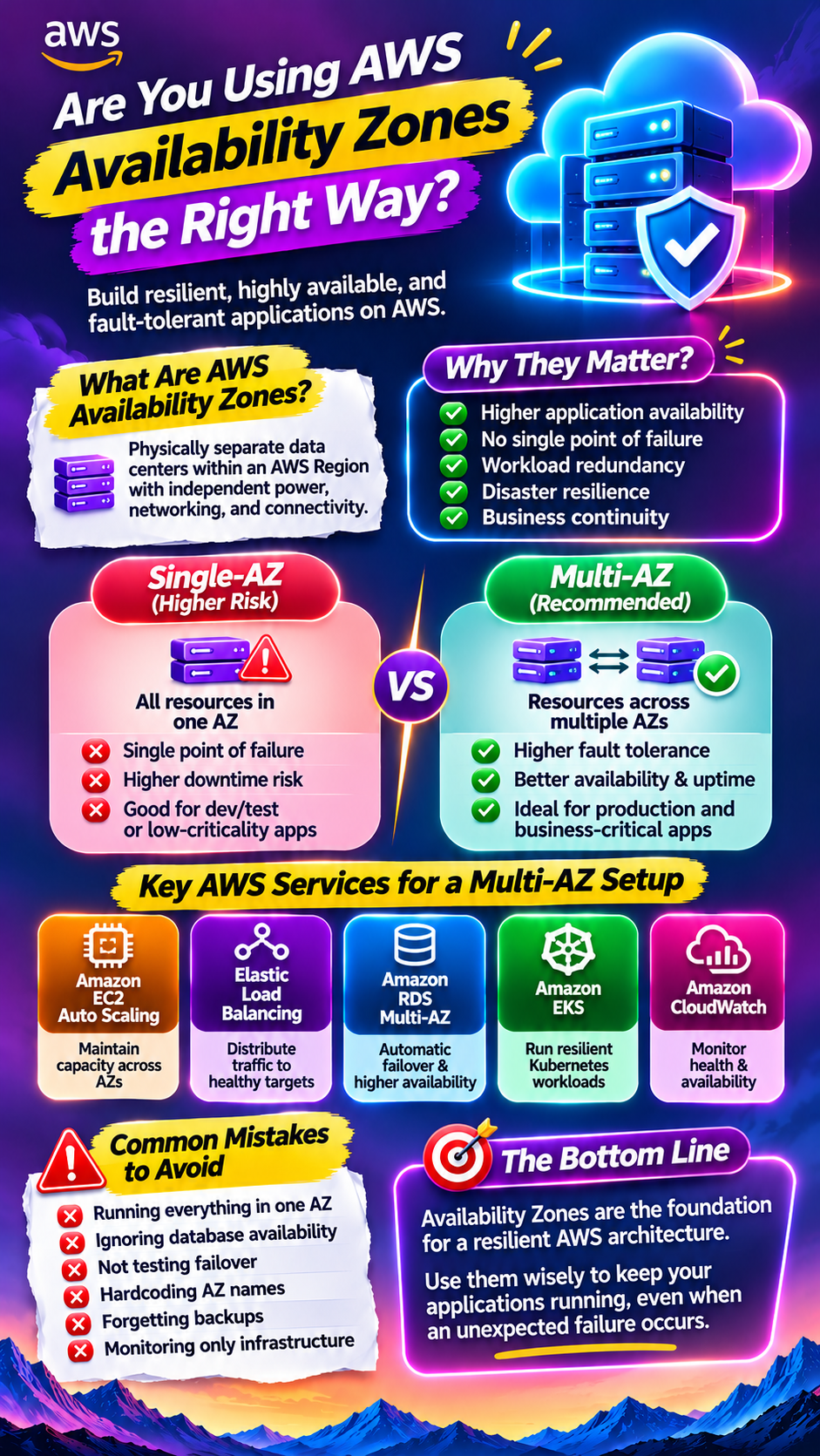
An Availability Zone (AZ) is one or more physically separate data centres within an AWS Region, designed with independent infrastructure and redundant power, networking, and connectivity.
Each AWS Region contains multiple Availability Zones.
For example, an application deployed in the Mumbai Region can use multiple Availability Zones to improve availability and reduce the impact of localized infrastructure failures.
Each Availability Zone is designed to operate independently, while high-bandwidth, low-latency networking connects the zones within a Region.
This allows businesses to distribute application resources across different locations instead of depending on a single data centre.
<AsyncImage query="AWS region multiple availability zones architecture diagram separate data centers connected network" aspectRatio="16:9" width="100%"/>Why do Availability Zones matter?
They help organizations:
- Reduce dependency on a single location.
- Improve application availability.
- Support workload redundancy.
- Design disaster-resilient applications.
- Distribute infrastructure across separate facilities.
- Reduce the impact of localized failures.
However, these benefits depend on how the architecture is designed and configured.
2. The Biggest Mistake: Running Everything in One Availability Zone
Imagine a business hosting its entire application in one Availability Zone.
Its architecture includes:
- EC2 instances running the application.
- An Amazon RDS database.
- Application load balancing components.
- Supporting infrastructure.
Everything works perfectly until that Availability Zone experiences an outage.
The application may become unavailable because all critical resources depend on the same location.
This is a single point of failure.
Even if your application runs on multiple EC2 instances, placing all of them in the same Availability Zone does not protect against an Availability Zone-level disruption.
How can you avoid this?
Distribute application resources across multiple Availability Zones where the relevant AWS services and architecture support it.
For example:
- Run EC2 instances in multiple Availability Zones.
- Configure an Application Load Balancer across multiple zones.
- Use supported Multi-AZ database configurations.
- Maintain appropriate backup and recovery arrangements.
The objective is to ensure that an issue in one Availability Zone does not automatically bring down the entire application.
3. How Multi-AZ Architecture Improves Application Availability
Multi-AZ architecture means distributing application resources across multiple Availability Zones within an AWS Region.
Consider an e-commerce application that receives thousands of requests every minute.
Instead of running everything in one Availability Zone, the business distributes its application servers across two or more zones.
A simplified architecture could look like this:
<AsyncImage query="AWS multi AZ architecture diagram application load balancer EC2 instances across availability zone A and B RDS" aspectRatio="16:9" width="100%"/>How it works:
1. Users send requests to the application.
2. An Elastic Load Balancer distributes traffic across healthy targets in multiple Availability Zones.
3. EC2 instances process application requests in different zones.
4. The database uses an appropriate Multi-AZ configuration.
5. Health checks help identify unhealthy targets.
6. The architecture is designed to continue operating when one zone becomes unavailable.
This approach can significantly improve availability, provided that application dependencies and failover mechanisms are also designed correctly.
4. Single-AZ vs. Multi-AZ: What's the Difference?
Both deployment approaches have their place, but they serve different requirements.
Factor| Single-AZ| Multi-AZ
Deployment| Resources in one AZ| Resources distributed across multiple AZs
Availability| More exposed to AZ failure| Better resilience to localized AZ failures
Infrastructure cost| Generally lower| Often higher
Redundancy| Limited across AZs| Designed for cross-AZ redundancy
Failure handling| May require recovery or redeployment| Can support failover or continued operation
Best suited for| Development and suitable low-criticality workloads| Production and availability-sensitive workloads
Important: Multi-AZ does not mean every AWS service automatically fails over in the same way. The behaviour depends on the service and its configuration.
5. AWS Services That Help You Build Multi-AZ Architecture
AWS offers several services that support high availability across Availability Zones.
A. Amazon EC2 Auto Scaling
Amazon EC2 Auto Scaling helps maintain the required number of EC2 instances across configured Availability Zones.
If an instance becomes unhealthy, Auto Scaling can replace it based on the configured health checks and scaling policies.
For production workloads, teams can distribute instances across multiple Availability Zones.
B. Elastic Load Balancing
Elastic Load Balancing distributes incoming application traffic across registered targets.
An Application Load Balancer can be configured across multiple Availability Zones to route traffic to healthy application instances.
This helps prevent traffic from being sent to unhealthy targets.
C. Amazon RDS Multi-AZ
Amazon RDS Multi-AZ deployments provide database availability through synchronous replication and managed failover, depending on the deployment configuration and database engine.
If the primary database instance becomes unavailable, RDS can fail over to a standby instance in another Availability Zone.
The failover process is managed by AWS, although applications should still be designed to reconnect and handle temporary interruptions.
D. Amazon EKS
Amazon Elastic Kubernetes Service supports highly available Kubernetes control planes across multiple Availability Zones.
Teams can also distribute worker nodes and application workloads across multiple zones to improve resilience.
However, workload placement, storage, networking, and disruption handling must be configured appropriately.
E. Amazon CloudWatch
CloudWatch helps monitor application and infrastructure performance.
Teams can configure alarms to identify:
- Unhealthy application targets.
- Increased error rates.
- Infrastructure failures.
- High CPU utilization.
- Application latency.
Monitoring helps teams identify problems before they create larger operational disruptions.
6. Cross-AZ Data Transfer: The Hidden Cost You Should Understand
Multi-AZ architecture improves resilience, but it can also introduce additional costs.
One important consideration is cross-AZ data transfer.
When resources in different Availability Zones communicate, applicable data transfer charges may apply depending on the service and traffic path.
For example:
- Application servers communicating with databases across zones.
- Microservices exchanging large amounts of data.
- Frequent internal API requests.
- High-volume data processing workloads.
These costs can become significant in architectures with frequent cross-zone communication.
How can businesses manage these costs?
- Understand application communication patterns.
- Avoid unnecessary cross-zone data movement.
- Use caching where appropriate.
- Review network traffic regularly.
- Monitor spending through AWS Cost Explorer.
- Evaluate architecture and resilience requirements together.
Do not remove necessary redundancy simply to reduce costs. The objective is to balance availability, performance, and spending.
7. Common AWS Availability Zone Mistakes to Avoid
Even organizations using Multi-AZ architecture can make mistakes that affect reliability.
1. Deploying multiple servers in the same AZ
Having several EC2 instances does not provide Availability Zone resilience if they all depend on the same zone.
2. Ignoring database availability
An application may run across multiple zones while its database remains a single point of failure.
3. Not testing failover
A failover configuration should be tested under controlled conditions to confirm that applications recover as expected.
4. Hardcoding Availability Zone assumptions
Availability Zone names such as "ap-south-1a" can map differently between AWS accounts. Use appropriate architecture and account-aware placement rather than assuming AZ names are identical across accounts.
5. Ignoring application dependencies
Even if EC2 instances are distributed across zones, an unavailable external service or shared dependency can still disrupt the application.
6. Forgetting backups
Multi-AZ improves availability, but it does not replace backups. Accidental deletion, data corruption, and other incidents require separate recovery arrangements.
7. Monitoring only infrastructure health
Healthy servers do not necessarily mean healthy applications. Monitor application-level performance, transactions, and user experience as well.
8. How to Design a Better Multi-AZ AWS Architecture
Before deploying a production application, businesses should consider these practical steps:
Step 1: Identify critical workloads
Understand which applications, databases, and services require high availability.
Step 2: Define availability requirements
Determine acceptable downtime and data loss using Recovery Time Objectives (RTO) and Recovery Point Objectives (RPO).
Step 3: Distribute application resources
Use multiple Availability Zones for suitable compute and application components.
Step 4: Design database resilience
Select an appropriate Multi-AZ database configuration and establish independent backup and recovery procedures.
Step 5: Configure health checks and monitoring
Use Elastic Load Balancing health checks and Amazon CloudWatch to monitor application availability.
Step 6: Test failure scenarios
Conduct controlled failover and recovery exercises to validate how the architecture behaves.
Step 7: Review costs and performance
Evaluate cross-AZ traffic, infrastructure spending, and application latency without compromising critical resilience requirements.
9. Multi-AZ vs. Multi-Region: Are They the Same?
This is another important distinction.
Many businesses assume that deploying resources across multiple Availability Zones automatically protects them against every type of infrastructure failure.
It does not.
Factor| Multi-AZ| Multi-Region
Location| Within one AWS Region| Across multiple AWS Regions
Primary objective| Resilience against AZ-level failures| Resilience against broader regional disruptions
Network latency| Generally low between AZs| Usually higher between Regions
Complexity| Often simpler| Generally more complex
Cost| Depends on architecture| Can involve significant additional costs
Best suited for| High availability within a Region| Business continuity across Regions
Multi-AZ is generally an important building block for highly available applications.
Multi-Region architecture may be appropriate when businesses require protection against regional disruptions, geographic distribution, or specific regulatory and latency requirements.
The right choice depends on the business's recovery objectives and risk tolerance.
Final Thoughts
AWS Availability Zones provide businesses with the foundation to build more resilient cloud infrastructure.
But simply selecting multiple Availability Zones during deployment is not enough.
Applications, databases, networking, storage, monitoring, and recovery procedures must work together to deliver meaningful availability.
A well-designed Multi-AZ architecture can reduce the impact of localized failures, improve application reliability, and support business continuity.
The real question isn't whether your AWS resources are running. It's whether your application can keep running when one part of your infrastructure fails.
Did you find this helpful?