The Hidden Danger of Sharing One AWS Account Across Multiple Teams | Savishty
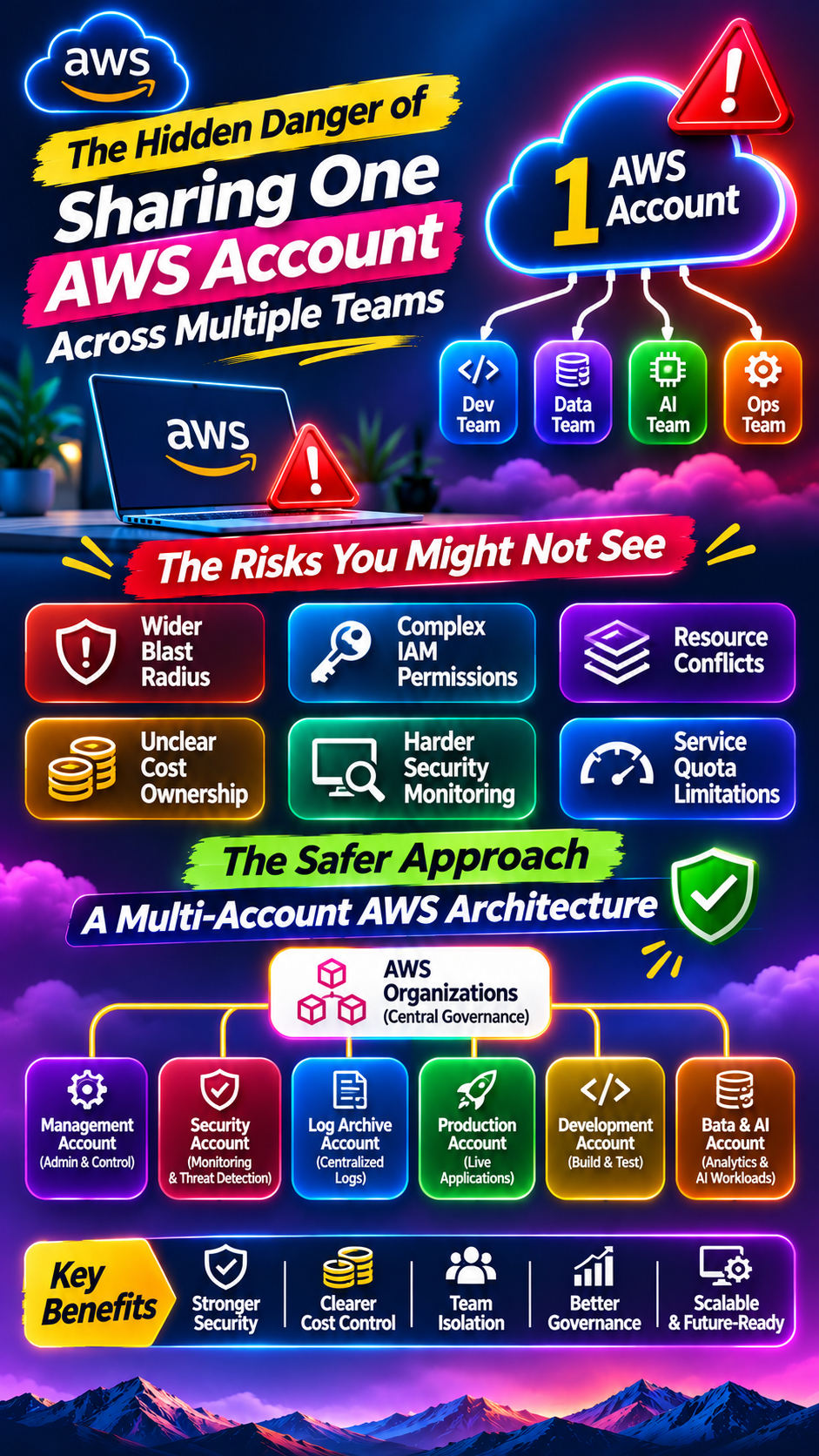
The Hidden Danger of Sharing One AWS Account Across Multiple Teams
Imagine your company has five development teams working on different projects. One team manages production applications, another handles data engineering, a third experiments with AI, and the remaining teams manage testing and infrastructure.
Everything runs inside the same AWS account.
Initially, this setup seems convenient. Everyone has access to the resources they need, billing is centralized, and infrastructure management appears simple.
But as the organization grows, problems start appearing.
A developer accidentally deletes a shared resource. One team modifies an IAM policy that affects another team. An experimental workload consumes resources needed by production. Suddenly, a small configuration mistake becomes an organization-wide problem.
The real danger isn't just that multiple teams share one AWS account. It's that they also share risks, permissions, resources, and operational boundaries.
Let's understand why this architecture can become a serious challenge and how businesses can build a safer AWS environment.
1. One Mistake Can Affect Multiple Teams
When multiple teams operate within a single AWS account, their resources may be separated logically, but they still share the same account-level security and operational boundaries.
Consider this situation:
Team A manages production applications.
Team B develops internal tools.
Team C experiments with machine learning.
Team D manages databases and analytics.
A developer from Team C accidentally modifies a shared IAM policy or deletes a resource used by Team A.
The impact may extend beyond the team responsible for the change.
This is commonly known as an expanded blast radius.
In a shared account, mistakes involving permissions, shared infrastructure, quotas, and resource configurations can affect multiple workloads.
What businesses should do:
Separate workloads based on business function and risk.
Use dedicated AWS accounts for production and non-production environments.
Restrict access to shared infrastructure.
Implement approval processes for sensitive changes.
Maintain tested backup and recovery procedures.
The objective is to prevent one team's mistake from becoming everyone's problem.
2. IAM Permissions Can Become Difficult to Control
Identity and Access Management (IAM) is one of the most important parts of AWS security.
When several teams share an account, managing permissions becomes increasingly complicated.
For example, a developer working on a testing application might receive permissions that also allow access to production resources.
This can happen when teams rely on broad IAM policies instead of role-based access.
Common risks include:
Excessive administrative permissions.
Shared IAM users and credentials.
Developers accessing resources outside their responsibilities.
Uncontrolled permission changes.
Difficulty identifying who accessed or modified a resource.
How can organizations improve access control?
AWS IAM supports role-based access through policies and roles.
Organizations can also use AWS IAM Identity Center to centrally manage workforce access across multiple AWS accounts.
A better access model should include:
Individual identities instead of shared user credentials.
Least-privilege permissions.
Role-based access for different teams.
Multi-factor authentication where appropriate.
Regular access reviews.
Temporary credentials instead of long-lived access keys wherever possible.
Remember: giving everyone administrative access may make operations easier initially, but it creates unnecessary security exposure.
3. Resource Conflicts Can Disrupt Daily Operations
Imagine two teams working on different applications but using the same AWS account.
One team changes a security group, modifies a shared networking component, or updates a resource used by another application.
Without clear ownership and change controls, these changes can cause unexpected disruptions.
Resource conflicts may involve:
Shared VPC infrastructure.
Security groups and network access.
IAM roles and policies.
Shared databases.
Load balancers.
S3 buckets and access policies.
Resource naming conventions alone cannot solve these problems.
Organizations need clear ownership, resource isolation, and controlled access to shared infrastructure.
For larger environments, separate AWS accounts can provide stronger boundaries between teams and workloads.
4. Cloud Costs Become Difficult to Attribute
One AWS bill. Multiple teams. Different projects. No clear ownership.
This is a common problem in shared-account environments.
Suppose the monthly AWS bill reaches ₹10 lakh.
How much did the AI team spend? How much belongs to production applications? Which project is responsible for increasing compute costs?
Without proper cost allocation, finance and engineering teams may struggle to identify where the money is going.
AWS provides several tools to improve visibility:
AWS Cost Explorer: Analyze spending patterns and identify cost drivers.
AWS Budgets: Set spending thresholds and configure alerts.
AWS Cost and Usage Reports: Access detailed billing and usage information.
AWS Cost Allocation Tags: Attribute costs to teams, projects, and environments.
However, tagging is not a complete substitute for account-level separation.
Dedicated accounts can make cost attribution, budget ownership, and financial reporting much easier.
5. Security Monitoring Becomes More Complicated
When multiple teams share one AWS account, monitoring security activity and investigating incidents can become difficult.
Imagine an unexpected configuration change takes place.
Your security team needs to determine:
Who made the change?
Which application was affected?
Was the change authorized?
Did it expose sensitive data?
Were other resources impacted?
AWS CloudTrail records account activity and API events, helping teams investigate actions performed within their AWS environment.
Other useful services include:
Amazon CloudWatch: Monitors infrastructure and application activity.
AWS Config: Tracks resource configurations and evaluates compliance.
Amazon GuardDuty: Detects potential security threats.
AWS Security Hub CSPM: Provides centralized visibility into security posture and findings across supported environments.
For organizations managing multiple AWS accounts, centralized logging and security monitoring can make investigations more structured.
6. One Account Can Create Resource Limitations
AWS accounts have service quotas that limit how many resources can be used for particular services.
When multiple teams operate in one account, they may compete for the same account-level quotas.
For example:
One team consumes available EC2 capacity quotas.
Another team needs additional resources for a production launch.
A data engineering team increases its usage of a particular AWS service.
A new application cannot scale because a relevant quota has been reached.
This can create unexpected delays, particularly when teams have different workload requirements.
Organizations should regularly review service quotas and request increases when necessary.
AWS Service Quotas helps teams monitor and manage supported service limits.
Separating workloads across accounts can also provide more independent quota boundaries for many AWS services.
7. The Better Approach: AWS Multi-Account Architecture
So, should every team get its own AWS account?
Not necessarily.
The goal is not to create hundreds of accounts without a strategy. The goal is to establish boundaries that reflect business needs, security requirements, and operational responsibilities.
AWS recommends using a multi-account strategy for organizations that need stronger isolation and centralized governance.
A possible structure could look like this:
AWS AccountPurposeManagement AccountOrganization-level administrationSecurity AccountSecurity operations and monitoringLog Archive AccountCentralized log storageProduction AccountLive business applicationsDevelopment AccountDevelopment workloadsTesting AccountQA and testing environmentsData & AI AccountAnalytics and AI workloads
<AsyncImage query="AWS multi account architecture diagram AWS Organizations management account security log archive production development testing accounts" aspectRatio="16:9" width="100%" />
This structure helps organizations separate responsibilities while maintaining centralized governance.
Important AWS services for multi-account management
1. AWS Organizations
Helps businesses centrally manage multiple AWS accounts and organize them into organizational units (OUs).
2. Service Control Policies (SCPs)
Set permission guardrails for accounts and organizational units. SCPs do not grant permissions; they define the maximum available permissions within their scope.
3. AWS IAM Identity Center
Provides centralized workforce access management across supported AWS accounts.
4. AWS Control Tower
Helps establish and govern a multi-account AWS environment using a landing zone and predefined controls.
5. AWS CloudTrail
Supports centralized collection and investigation of account activity logs.
Together, these services help organizations build a more controlled and scalable cloud environment.
8. When Should Your Business Move to Multiple AWS Accounts?
A single AWS account may be sufficient for a small project or early-stage organization.
However, businesses should consider a multi-account strategy when:
Multiple teams require different access permissions.
Production and development workloads need stronger isolation.
Regulatory or compliance requirements demand separation.
Cloud spending is difficult to attribute.
Different teams manage independent applications.
Security teams need centralized governance.
Resource quotas and operational dependencies are becoming difficult to manage.
The decision should be based on risk, complexity, scale, and business requirements rather than simply the number of employees.
Final Thoughts
Sharing one AWS account may seem like an efficient decision when an organization is small.
But as teams, applications, and workloads grow, the same setup can introduce security risks, resource conflicts, unclear cost ownership, and operational challenges.
A well-designed multi-account architecture helps businesses establish stronger boundaries without losing centralized control.
The goal is simple: give every team the flexibility to work independently without allowing one team's mistake to affect the entire organization.
Did you find this helpful?