Everything Looks Green in AWS. So Why Are Users Complaining? | Savishty
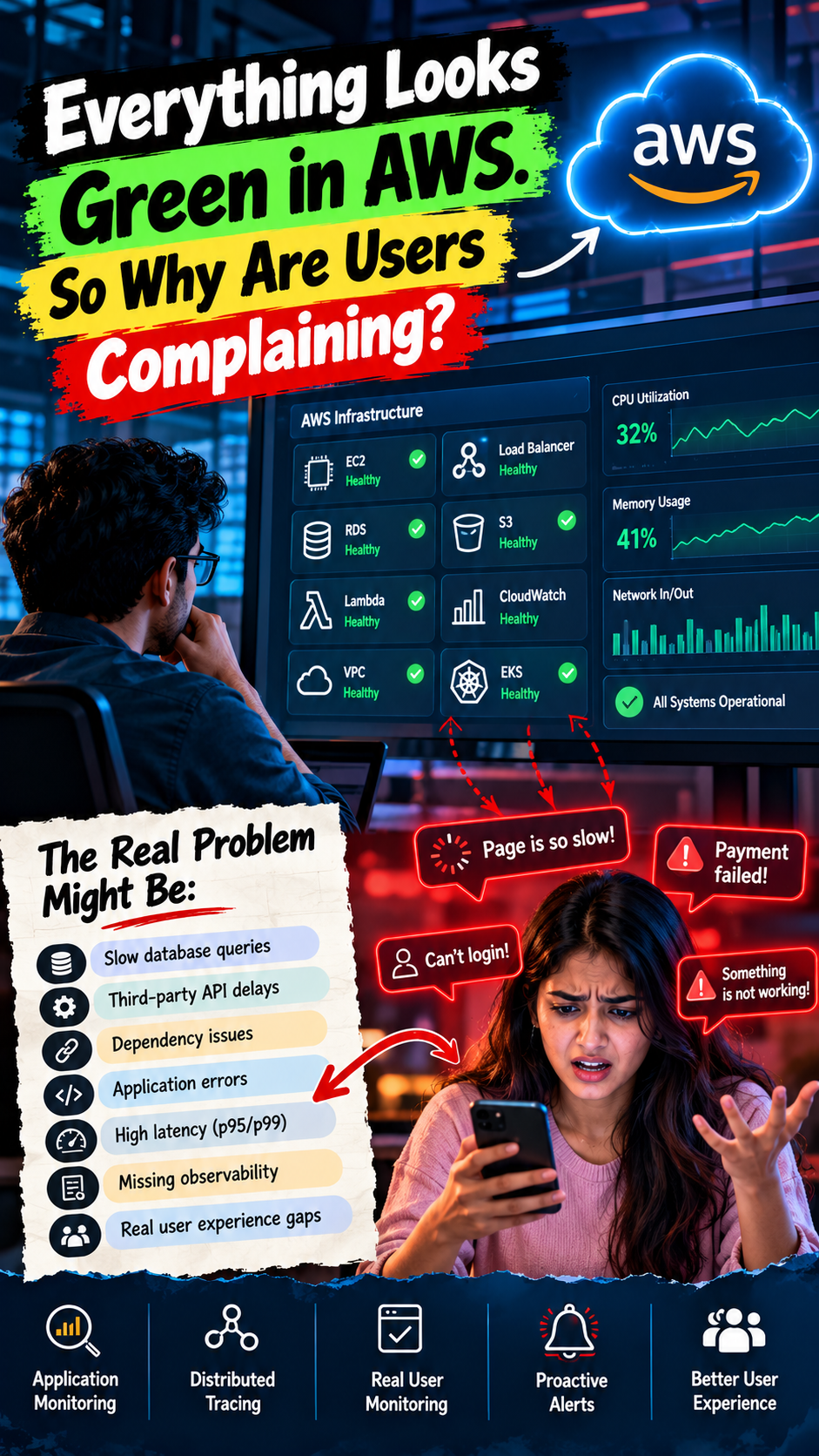
Everything Looks Green in AWS. So Why Are Users Complaining?
Your AWS dashboard is green.
EC2 instances are running. CPU utilization looks normal. Memory usage seems fine. No major alarms are firing.
From an infrastructure perspective, everything appears healthy.
But your customers are experiencing slow pages, failed transactions, delayed responses, and endless loading screens.
Your support team is receiving complaints. Your developers are checking dashboards. Your DevOps team insists that the infrastructure is working as expected.
So, what's actually going wrong?
The problem is that healthy infrastructure doesn't always mean a healthy application.
In modern cloud environments, a system can look perfectly normal at the infrastructure level while delivering a terrible experience to its users.
Let's explore why this happens, where AWS monitoring can fall short, and how teams can identify problems before customers report them.
1. Your Servers Are Healthy, but Your Application Is Slow
One of the biggest mistakes in cloud monitoring is assuming that server health reflects application performance.
Imagine your application runs on Amazon EC2.
CPU utilization is at 35%. Memory consumption is stable. The instance status checks are passing.
Everything looks fine.
But users are waiting six seconds for a page to load.
Why?
The problem could be somewhere else:
A slow database query
An overloaded connection pool
A third-party API responding slowly
An inefficient application function
Excessive network latency
A service waiting for another service to finish
Your EC2 instance may be healthy because it isn't experiencing resource pressure. Yet the application running on it may be blocked while waiting for a dependency.
Infrastructure monitoring tells you whether resources are functioning. Application monitoring tells you whether the software is delivering the expected experience.
You need both.
2. Your Database Could Be Quietly Slowing Everything Down
Your application servers may have plenty of available CPU and memory, but that doesn't mean requests are being processed quickly.
A database can become a bottleneck even when the rest of the infrastructure looks healthy.
For example, a customer clicks the checkout button. The application sends a query to the database, but the query takes several seconds to complete.
The application waits.
The customer waits.
The server continues running.
Your infrastructure dashboard might not show an obvious problem because CPU utilization remains moderate.
Potential causes include:
Inefficient SQL queries
Missing or inappropriate indexes
Database connection exhaustion
Lock contention
Slow storage operations
Excessive database requests
Connection pool misconfiguration
What should you monitor?
For Amazon RDS and Amazon Aurora, examine metrics such as database connections, CPU utilization, storage performance, and read/write latency where applicable.
Use database performance tools, query analysis, and application traces to investigate the actual cause.
The important thing is to correlate database behavior with the requests users are experiencing.
A database doesn't need to crash to become a business problem. Sometimes, it only needs to become slow.
3. Your Third-Party API Is Affecting Your Application
Modern applications rarely operate independently.
Your AWS-hosted application may depend on payment gateways, authentication providers, email services, external APIs, or other SaaS platforms.
Now imagine your payment provider starts responding slowly.
Your application servers are healthy. Your database is available. Your AWS services are operational.
But checkout requests are taking too long because the application is waiting for the payment API.
This is a dependency problem.
And it can be difficult to identify if your monitoring focuses only on infrastructure that you control.
How can you fix it?
Monitor external dependency latency, timeout rates, and error responses.
Where appropriate, implement:
Sensible request timeouts
Controlled retries with backoff
Circuit breakers
Fallback behavior
Queue-based processing for suitable tasks
Clear error handling
Be careful with retries. Uncontrolled retries can multiply traffic and make an already struggling service perform even worse.
The objective is to prevent one slow dependency from unnecessarily affecting the entire application.
4. Your Monitoring Measures Averages, Not the Worst Experiences
Here's another common problem: average response time.
Suppose an application processes 10,000 requests.
Most requests finish in 200 milliseconds, but a small percentage take five seconds.
The average may still look acceptable, even though some users experience serious delays.
This is why engineering teams should examine percentile latency, not just averages.
p50: The median response time.
p95: The response time at or below which 95% of requests complete.
p99: The response time at or below which 99% of requests complete.
If p50 is 200 ms but p99 is 4 seconds, a portion of users may be experiencing a significantly slower application.
The exact interpretation depends on how requests are measured and which traffic is included.
What should you do?
Track latency percentiles for critical user journeys, such as:
Login
Search
Checkout
File uploads
Dashboard loading
API requests
A green average doesn't necessarily mean a good customer experience.
Measure the slowest experiences, not just the average one.
5. Your Application Is Failing Without Your Servers Failing
An application can return errors even when every server is technically operational.
For example:
A request returns HTTP 500.
A payment fails because of an application exception.
An API returns incorrect data.
A background job silently stops processing.
A queue accumulates messages faster than workers can handle them.
Your EC2 instances might still be running. Your load balancer might still accept traffic. Your AWS console might show no infrastructure outage.
Yet users cannot complete their tasks.
This is where application-level monitoring becomes essential.
Track indicators such as:
HTTP 4xx and 5xx responses
Failed transactions
Request timeouts
Queue backlog and message age
Background job failures
Business transaction success rates
For applications using Amazon SQS, for example, queue depth and the age of the oldest message can reveal processing delays that server CPU metrics might miss.
Don't just ask whether your servers are running.
Ask whether your application is successfully completing the work it was built to do.
6. Your CloudWatch Dashboard Doesn't Show the Whole Story
Amazon CloudWatch is an important part of AWS monitoring. It provides access to metrics, logs, alarms, and other observability capabilities.
But the usefulness of a monitoring setup depends on what teams choose to measure and how they connect the information.
If your dashboard only shows CPU, memory, instance status, and network traffic, you may miss application-level problems.
For example, a dashboard might tell you that an EC2 instance is healthy without explaining why a checkout request is taking four seconds.
Build monitoring around user journeys
Instead of relying on a single infrastructure dashboard, combine several signals:
Infrastructure metrics: CPU, memory, disk, and network behavior.
Application metrics: Request latency, error rates, throughput, and transaction success.
Logs: Exceptions, failed requests, and relevant diagnostic details.
Distributed traces: The time spent in individual services, database calls, and external dependencies.
AWS services and tools such as CloudWatch, AWS X-Ray, and OpenTelemetry-compatible instrumentation can help teams build this broader view.
The goal is to connect what the infrastructure is doing with what the user is experiencing.
7. Your Health Checks Are Too Basic
A health check might simply confirm that an application process is running or that a server can respond to a request.
But responding to a health check doesn't necessarily mean the application can perform its core functions.
Imagine a shopping application that returns HTTP 200 for its homepage while its checkout service is unable to reach the database.
The homepage works.
The checkout doesn't.
A basic health check may continue to pass even though a critical customer journey is broken.
Use the right types of checks
Depending on the architecture, consider:
Liveness checks: Is the process running, or does it need to be restarted?
Readiness checks: Is the application ready to receive traffic?
Synthetic monitoring: Can a simulated user complete an important journey?
Real user monitoring: What performance are actual users experiencing?
Dependency checks: Are critical supporting services functioning?
Avoid making every health check depend on every external service. Poorly designed dependency checks can cause healthy application instances to be marked unhealthy unnecessarily.
Health checks should reveal meaningful failures without creating new ones.
8. You Discover Problems Only After Customers Complain
If your support team consistently identifies problems before your monitoring system does, your monitoring strategy needs improvement.
This doesn't necessarily mean you need more dashboards or more alarms.
You need better signals.
For example, a synthetic monitoring test could periodically attempt to log in, search for a product, or complete a safe test transaction.
If a critical journey fails, the system can alert the appropriate team.
Real user monitoring can complement this by revealing performance differences across browsers, devices, geographic locations, and network conditions.
Not every application needs every monitoring technique. Start with the customer journeys that matter most to the business.
The objective is to detect customer-impacting problems before they become a flood of support tickets.
A Practical AWS Observability Checklist
Use this checklist to assess whether your monitoring covers more than infrastructure health.
Monitor application latency at p50, p95, and p99.
Track error rates and failed business transactions.
Monitor database performance and connection usage.
Measure latency and errors for critical external APIs.
Collect application logs with useful correlation identifiers.
Use distributed tracing for multi-service requests.
Monitor queues and background processing delays.
Configure meaningful CloudWatch alarms.
Test important customer journeys with synthetic monitoring.
Review real user experience where appropriate.
Connect alerts to documented incident response procedures.
Test alerts regularly to ensure they identify real problems.
Final Thoughts: Monitor the Experience, Not Just the Infrastructure
AWS infrastructure monitoring is essential, but it represents only one part of application observability.
Your EC2 instances can be running. Your databases can be available. Your dashboards can be green.
And your customers can still be having a terrible experience.
The difference lies in what you're measuring.
Are you monitoring servers, or are you monitoring the actual services those servers deliver?
Are you measuring average response times, or are you identifying the users experiencing extreme delays?
Are you checking whether a process is alive, or whether customers can successfully complete their tasks?
The most effective monitoring strategy combines infrastructure metrics, application performance, logs, traces, and user-experience signals.
Because ultimately, customers don't care whether your CPU utilization is 35% or 75%.
They care whether your application works.
The real definition of a healthy cloud application isn't a green dashboard. It's a reliable, responsive experience for the people using it.
Did you find this helpful?