Why Your Cloud Migration Timeline Keeps Slipping | Savishty
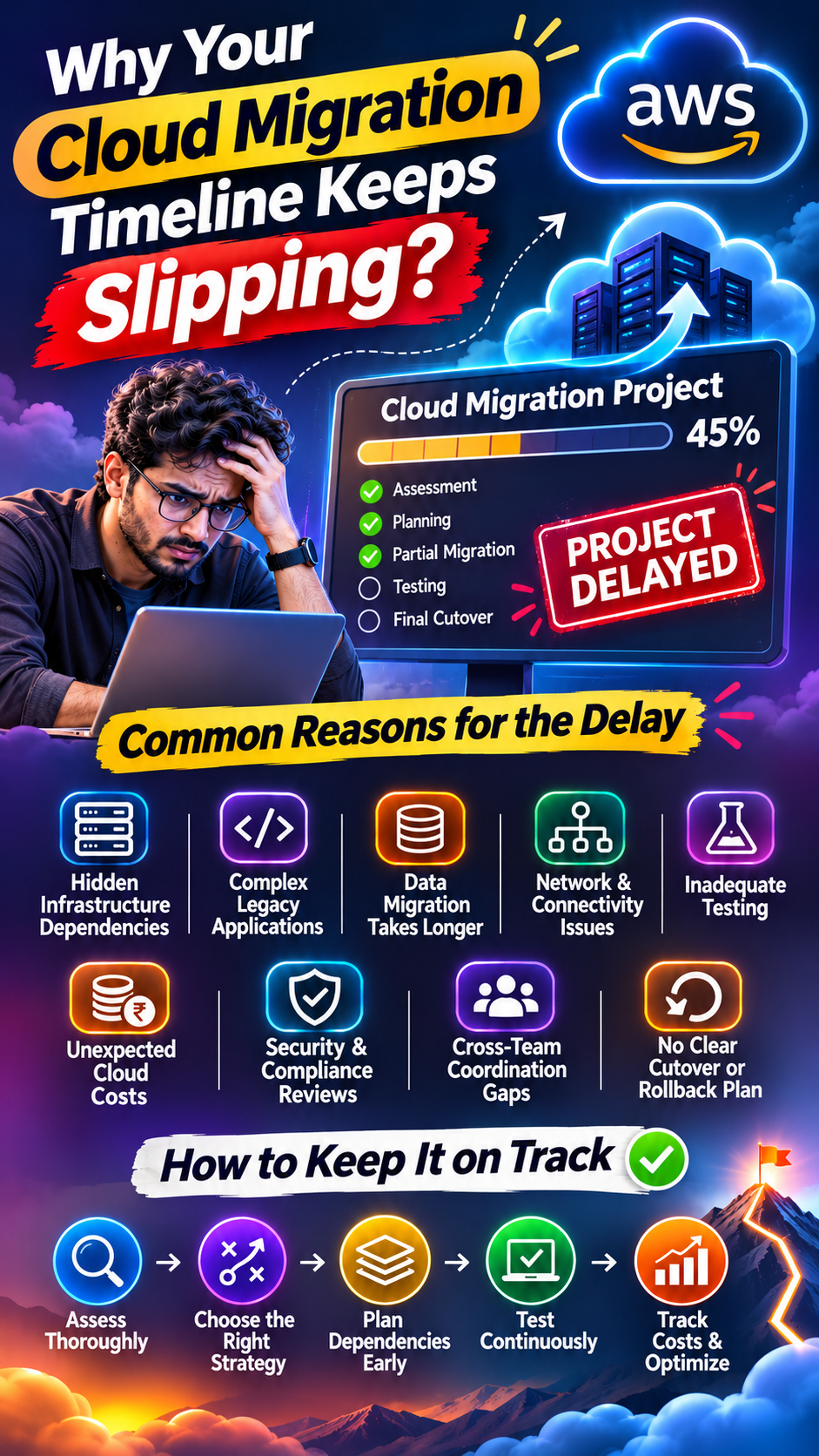
The cloud migration project was supposed to take three months.
The team created a roadmap, assigned responsibilities, selected the target cloud platform, and finalized the migration strategy.
Everything looked organized.
But three months later, the project was still incomplete.
Some applications hadn't been migrated. Database dependencies were creating unexpected problems. Testing was taking longer than expected, and the budget was gradually increasing.
The deadline was pushed again.
Sound familiar?
Cloud migration projects rarely get delayed because of just one major problem. More often, several small challenges accumulate until the original timeline becomes unrealistic.
The biggest mistake companies make is planning cloud migration as if moving workloads were the same as moving files from one location to another.
It's not.
Let's explore why cloud migration timelines keep slipping and what businesses can do to keep their projects on track.
1. Nobody Fully Understands the Existing Infrastructure
Before migrating anything, organizations need to understand what they already have.
This sounds obvious, but many businesses underestimate the complexity of their existing IT environments.
An application might depend on:
Multiple databases
Legacy operating systems
Internal APIs
Third-party integrations
Shared storage systems
Authentication services
Background processing jobs
Older applications that nobody actively maintains
The problem begins when these dependencies are discovered halfway through the migration.
For example, a company plans to migrate an application to AWS. During testing, the team discovers that the application depends on an older database version that isn't supported by the intended target configuration.
Now the team must evaluate database upgrades, application compatibility, and alternative migration approaches.
The original migration plan needs to change.
What should companies do?
Conduct a detailed infrastructure assessment before migration.
Document application dependencies, database versions, network requirements, operating systems, integrations, and workload ownership.
Tools such as AWS Application Discovery Service and AWS Migration Hub can help organizations discover and track aspects of their migration landscape.
You cannot create a realistic migration timeline without understanding what you're migrating.
2. Legacy Applications Are More Complicated Than They Look
Some applications have been running for years.
They work, generate revenue, and support important business operations.
But nobody wants to modify them.
Why?
Because their architecture may depend on outdated libraries, unsupported software, tightly coupled components, or undocumented business logic.
A simple migration can suddenly become an application modernization project.
Consider a legacy application running on an older operating system.
Moving it to a cloud environment might be technically possible, but the application may require changes to its runtime, database connections, authentication, or storage configuration.
The team now has to decide whether to:
Rehost the application.
Replatform it.
Refactor the application.
Replace it with a different solution.
Retain it temporarily.
These are different migration strategies, and each has different timelines and risks.
The solution
Classify workloads before migration.
Not every application needs modernization immediately.
Some workloads can be migrated with minimal changes, while others need deeper engineering work.
Make these decisions early instead of discovering them during deployment.
3. Data Migration Takes Longer Than Expected
Moving application infrastructure is one thing.
Moving large volumes of business data is another.
Organizations often underestimate the time required to migrate databases, file systems, backups, and other business-critical information.
Challenges can include:
Large database sizes
Limited network bandwidth
Data consistency requirements
Replication delays
Data validation
Downtime restrictions
Complex database dependencies
Imagine migrating a business database containing several terabytes of information.
The team completes the initial data transfer, but the source database continues receiving transactions.
Now the team needs to synchronize the remaining changes before switching production traffic.
If replication lag increases or data validation identifies inconsistencies, the cutover gets delayed.
How can teams improve this?
Use an appropriate migration strategy.
AWS Database Migration Service (AWS DMS) supports database migration and ongoing replication for supported source and target combinations.
For suitable workloads, teams can use continuous replication to reduce the amount of data that needs to be synchronized during cutover.
Also plan for:
Data integrity checks
Backup verification
Replication monitoring
Cutover rehearsals
Recovery procedures
Never consider data migration complete simply because the transfer finished.
The data must also be accurate, consistent, and usable.
4. Network Configuration Becomes an Unexpected Roadblock
Cloud migration isn't only about moving applications and databases.
The network connecting everything must work correctly too.
During migration, teams may encounter problems involving:
VPC configuration
Subnet planning
Route tables
Security groups
Network ACLs
VPN connectivity
DNS resolution
Hybrid connectivity
Firewall restrictions
For example, an application may successfully migrate to an AWS EC2 instance but fail to communicate with an internal service still running in the company's data center.
The application is deployed.
The server is healthy.
But the required network connection isn't working.
The migration team now needs to investigate routing, firewall rules, DNS, and connectivity.
The solution
Design the target network architecture before migrating production workloads.
Validate connectivity between on-premises infrastructure and AWS.
For hybrid environments, evaluate options such as AWS Site-to-Site VPN and AWS Direct Connect based on business requirements.
Test network dependencies before the production cutover, not after it.
5. Testing Gets Treated as the Last Step
One of the biggest reasons migration timelines slip is inadequate testing.
Teams often allocate most of their project time to infrastructure deployment and data movement.
Testing receives whatever time remains.
Then problems appear.
The application works, but response times are slower. Certain integrations fail. User permissions behave differently. Reports produce inconsistent results.
Now the team must troubleshoot issues that could have been identified earlier.
What should be tested?
A proper cloud migration testing strategy should include:
Functional testing: Does the application perform its intended operations?
Performance testing: Can the migrated environment handle expected workloads?
Security testing: Are access controls, permissions, and configurations correct?
Integration testing: Do connected systems communicate correctly?
Data validation: Is migrated information complete and accurate?
User acceptance testing: Can actual users perform their business tasks successfully?
Testing shouldn't be a final checkpoint.
It should be part of every major migration phase.
6. Cloud Cost Planning Happens Too Late
Another common problem is discovering that the target cloud environment costs more than expected.
The migration team initially focuses on getting workloads moved.
Later, finance and engineering discover unexpected expenses involving:
Oversized EC2 instances
Storage requirements
Data transfer
Backup retention
Licensing
Monitoring services
Managed database costs
Hybrid infrastructure operating costs
Now the organization needs to revisit its architecture and budget.
Some resources may need right-sizing. Certain services may need to be redesigned.
This creates additional work and delays.
The solution
Include cloud cost estimation in the initial migration assessment.
AWS Pricing Calculator can help estimate costs for planned AWS workloads.
Organizations should also consider the ongoing cost of running both on-premises and cloud environments during a phased migration.
Remember:
A migration isn't successful just because the workloads moved. The new environment must also make financial and operational sense.
7. Security and Compliance Reviews Delay Production Cutover
Moving workloads to the cloud changes how infrastructure is accessed, monitored, and secured.
Organizations may need to review:
IAM roles and permissions
Encryption requirements
Data residency
Network access
Audit logging
Backup policies
Regulatory requirements
Third-party access
Security monitoring
For businesses handling sensitive customer or financial information, these reviews can be substantial.
Imagine the application is ready for production, but the security team identifies missing encryption controls or incomplete access policies.
The migration cannot proceed until the issues are addressed.
What should companies do?
Involve security and compliance teams from the beginning.
Use security reviews as part of migration planning rather than treating them as final approval requirements.
AWS services such as AWS Config, AWS CloudTrail, and AWS Security Hub can support different aspects of configuration visibility, auditing, and security posture management.
The goal is to identify compliance requirements before the migration reaches production.
8. Teams Underestimate the Human Side of Cloud Migration
Cloud migration is not only a technology project.
It's also a people and process challenge.
Developers, infrastructure engineers, database administrators, security teams, finance teams, and business stakeholders all have different responsibilities.
Delays happen when:
Nobody owns a migration task.
Approval processes take too long.
Teams work with outdated documentation.
Business stakeholders aren't available for testing.
Cloud skills are missing.
Responsibilities are unclear.
For example, the infrastructure team may complete the AWS environment, but the application team hasn't prepared the application for deployment.
The database team may be ready, but the security team hasn't approved the connectivity model.
Each dependency pushes the next milestone further away.
The solution
Establish clear ownership.
Create a migration responsibility matrix, define decision-makers, document dependencies, and schedule cross-functional reviews.
A migration project needs coordination just as much as it needs technical expertise.
9. No Proper Cutover or Rollback Plan
Getting an application ready for AWS is only part of the migration.
The production cutover is where many hidden problems become visible.
What happens if DNS changes don't propagate as expected?
What if database replication falls behind?
What if users experience unexpected errors?
What if the migrated application cannot handle production traffic?
Without a properly rehearsed cutover and rollback strategy, even a minor issue can delay the entire launch.
Best practices
Before the final migration:
Rehearse the cutover.
Define the maintenance window.
Verify database synchronization.
Validate application functionality.
Monitor critical transactions.
Establish clear go/no-go criteria.
Document rollback steps.
Assign incident response responsibilities.
A rollback plan should also account for data written after cutover. Simply switching traffic back may not be safe if the source and target environments have diverged.
A successful migration plan must explain not only how to move forward, but also what happens if something goes wrong.
How to Keep Your AWS Cloud Migration on Schedule
Here is a practical checklist for organizations planning cloud migration.
Migration phaseWhat needs to happenDiscoveryIdentify workloads, dependencies, and ownersAssessmentEvaluate compatibility, risks, and migration strategiesPlanningDefine timelines, resources, and responsibilitiesArchitectureDesign networking, security, and target infrastructureData migrationPlan transfer, replication, and validationTestingValidate performance, security, and functionalityCutoverRehearse production migration and rollbackOptimizationReview performance, cost, and operational efficiency
Five questions to ask before starting
Do we know every critical application dependency?
Have we identified workloads that require modernization?
Is our data migration strategy realistic?
Have security, testing, and compliance teams been involved?
Do we have a tested production cutover and rollback plan?
If these questions don't have clear answers, the migration timeline may be more optimistic than realistic.
Final Thoughts: Cloud Migration Is a Transformation, Not a File Transfer
Cloud migration projects don't usually fail because organizations lack access to cloud technology.
They struggle because the existing environment is more complicated than expected.
Legacy applications, hidden dependencies, data transfer challenges, networking issues, security reviews, and unclear responsibilities can turn a three-month project into a much longer journey.
The solution isn't simply to move faster.
It's to plan better.
Understand your infrastructure. Choose the right migration strategy. Involve the right teams. Test early. Monitor continuously. And prepare for unexpected problems.
AWS provides powerful services and tools to support cloud migration, but successful execution depends on the decisions made before, during, and after the move.
Because the real goal isn't to migrate to the cloud as quickly as possible. It's to migrate without creating a bigger problem than the one you're trying to solve.
Did you find this helpful?