How to Build a Private Enterprise AI Assistant on AWS | Savishty
How to Build a Private Enterprise AI Assistant on AWS
Introduction: Your Business Needs AI. But Does Your Data Need to Leave Your Control?
Imagine an employee asking an AI assistant to summarize a confidential client contract, find a policy buried in hundreds of internal documents, or explain last quarter’s sales performance.
Within seconds, the assistant provides a useful answer.
Now imagine that the same assistant accidentally exposes sensitive company information, uses outdated documents, or sends confidential data to an unauthorized user.
That is the challenge enterprises face when adopting AI.
Businesses want the speed and productivity of generative AI, but they also need control over their data, security, regulatory compliance, and access permissions.
This is where a private enterprise AI assistant on AWS becomes valuable.
By combining AWS cloud infrastructure, foundation models, enterprise data sources, and security controls, organizations can build an AI assistant that helps employees find information, understand documents, and complete everyday tasks without treating confidential business data as public information.
In this guide, we’ll explore how it works, which AWS services can help, how to design the architecture, and what businesses should consider before deploying it.
What Is a Private Enterprise AI Assistant?
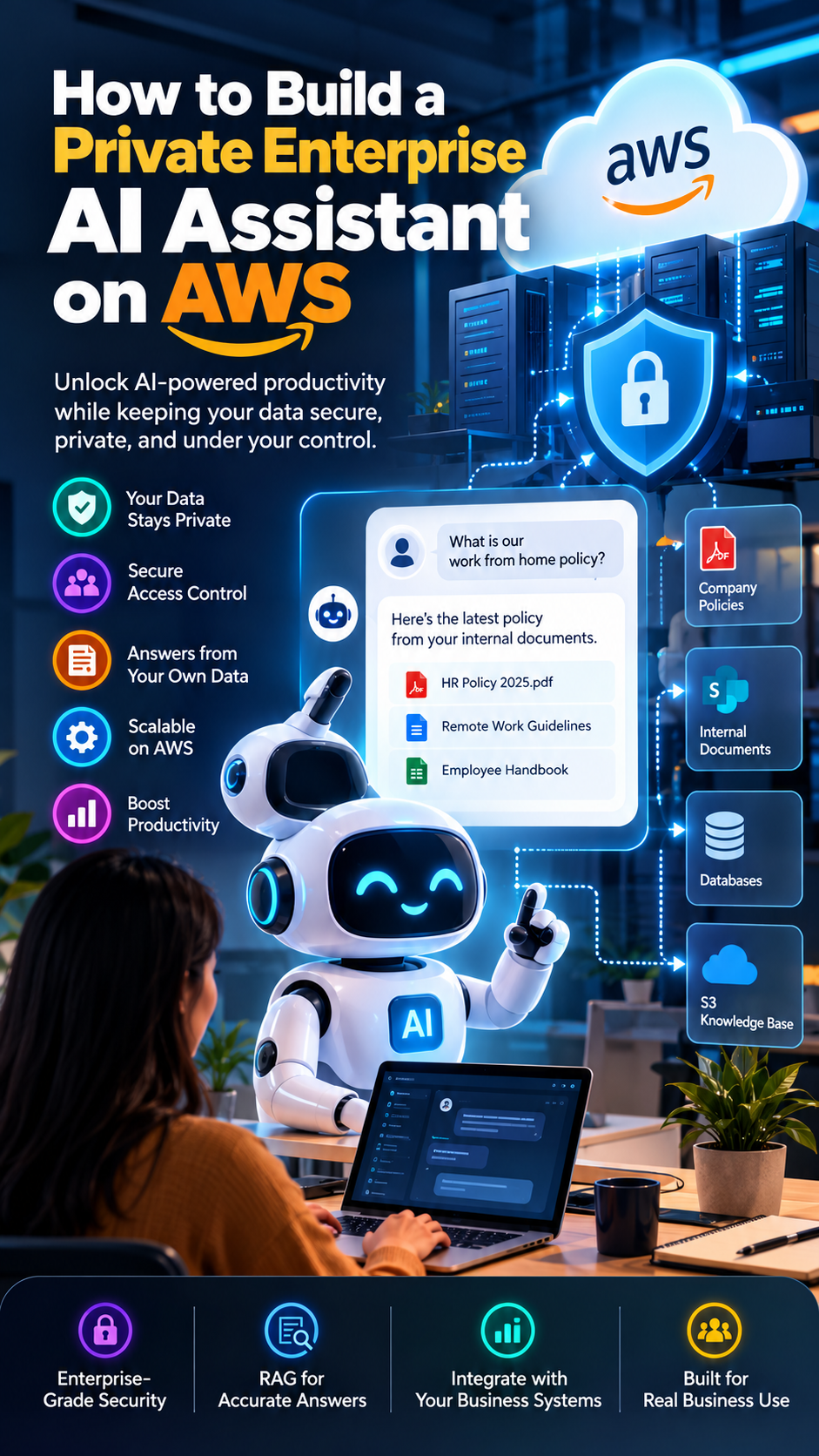
A private enterprise AI assistant is an AI-powered application designed to help employees access and use company information securely.
Unlike a general-purpose chatbot, it can be connected to approved internal sources, including:
Company policies and standard operating procedures
HR documentation and employee handbooks
Sales reports and business presentations
Technical documentation and engineering guides
Customer support knowledge bases
Internal project documents and FAQs
For example, an employee could ask:
“What is our current work-from-home policy, and where can I find the official document?”
The assistant retrieves relevant information from approved company sources and generates a response based on that information.
The key difference is that the assistant operates within a controlled enterprise environment, with authentication, authorization, data protection, and monitoring designed around the organization's requirements.
Private AI does not automatically mean that every component runs inside your own private network. The actual level of isolation depends on the AWS services, networking configuration, model deployment choices, and data-handling policies you implement.
Why Build an Enterprise AI Assistant on AWS?
AWS offers a range of services for building AI applications, managing data, securing access, and monitoring workloads.
Here are five reasons organizations may choose AWS for a private AI assistant.
1. Greater Control Over Data
Enterprises can design data flows around their internal security requirements. They can control which sources are indexed, which users can access specific information, and where application components communicate.
Services such as Amazon VPC, AWS IAM, AWS KMS, and AWS PrivateLink can support network isolation, access control, encryption, and private connectivity where supported by the selected service.
2. Access to Foundation Models
Amazon Bedrock provides access to supported foundation models through managed APIs, along with capabilities for building generative AI applications.
Organizations can evaluate different models based on response quality, latency, cost, language support, and business requirements.
3. Answers Grounded in Internal Knowledge
A private assistant can use Retrieval-Augmented Generation (RAG) to retrieve relevant information from company documents before generating a response.
This makes it possible to provide answers based on approved internal knowledge instead of relying only on a model's general training.
4. Scalable Cloud Infrastructure
AWS provides infrastructure and managed services that can support workloads as usage grows. Teams can design for expected traffic, monitor performance, and scale suitable components as needed.
5. Integration With Existing Systems
Depending on the architecture and available integrations, an enterprise assistant can connect to document repositories, databases, internal APIs, ticketing systems, and business applications.
This allows AI to become part of existing workflows rather than another disconnected tool.
Understanding the Architecture: How a Private AI Assistant Works
A secure enterprise AI assistant typically consists of six major layers.
1. User interface: An internal web application or chat interface where employees submit questions.
2. Identity and access management: Authentication verifies the user's identity, while authorization determines which information that user may access.
3. Application and orchestration layer: The application processes questions, applies business rules, and coordinates retrieval and model calls.
4. Knowledge retrieval layer: A search or vector retrieval system finds relevant passages from approved internal documents.
5. AI model layer: A foundation model generates a response using the user's question and the retrieved context.
6. Security and monitoring layer: Logging, encryption, access policies, and operational monitoring help protect the system and identify problems.
The workflow looks like this:
Employee asks a question → identity and permissions are checked → relevant documents are retrieved → the model generates a grounded response → the answer is returned with appropriate source references.
A well-designed assistant should also decline requests it cannot answer reliably or for which the user lacks permission.
AWS Services You Can Use
The exact services depend on your security requirements, document volume, expected traffic, and whether the assistant needs to perform actions or only answer questions.
Amazon Bedrock
Amazon Bedrock can provide access to supported foundation models and managed generative AI capabilities.
It can serve as the model layer for answering questions, summarizing documents, and generating responses from retrieved context.
Amazon S3
Amazon S3 can store source documents, such as PDFs, reports, policy files, and other approved knowledge assets.
Access policies, encryption, and lifecycle controls should be configured according to the sensitivity and retention requirements of the data.
Amazon Bedrock Knowledge Bases or a Custom Retrieval Pipeline
Amazon Bedrock Knowledge Bases can help connect supported data sources to retrieval and generation workflows.
Alternatively, teams can build a custom retrieval pipeline using services such as Amazon OpenSearch Service or another suitable search and vector storage solution.
The right choice depends on the required connectors, filtering capabilities, data scale, operational effort, and control over the retrieval process.
AWS IAM and Amazon Cognito
AWS IAM helps control access to AWS resources. Amazon Cognito can support user authentication for application experiences.
An enterprise deployment must connect identity and authorization decisions to the user's actual permissions. Simply logging in to the chatbot should not grant access to every document.
Amazon VPC and AWS PrivateLink
Amazon VPC provides network isolation for supported workloads. AWS PrivateLink can enable private connectivity to supported services.
These tools can reduce exposure to public networks, but the complete network design must account for every service, endpoint, and data flow.
AWS KMS
AWS Key Management Service helps manage encryption keys used to protect data.
Encryption should be considered for stored documents, indexes, application data, and other relevant resources, as well as for data transmitted between components.
Amazon CloudWatch and AWS CloudTrail
Amazon CloudWatch supports monitoring application performance, metrics, and logs. AWS CloudTrail records supported AWS API activity for auditing and investigation.
Logs should be designed carefully to avoid unnecessarily capturing confidential prompts, retrieved documents, credentials, or personal information.
Step-by-Step: How to Build a Private Enterprise AI Assistant on AWS
Step 1: Define the Business Use Case
Do not start by choosing a model. Start by identifying the business problem.
Ask:
Who will use the assistant?
Which questions should it answer?
What information is it allowed to access?
Which data classifications are involved?
Should it only provide answers, or should it also perform actions?
How will success be measured?
For an initial deployment, an internal policy assistant or technical documentation assistant is often a manageable starting point.
Define measurable goals, such as reducing time spent searching for documents, improving support response times, or increasing the percentage of questions answered with valid sources.
Step 2: Identify and Prepare Enterprise Data
Gather the documents the assistant is allowed to use.
These might include PDF files, Word documents, internal FAQs, technical guides, and approved knowledge-base content.
Before ingestion:
Remove obsolete and duplicate documents.
Identify confidential and restricted information.
Record document ownership and update dates.
Preserve access-control metadata.
Establish a process for updating or removing documents.
Poor-quality source data leads to poor-quality answers. If the official policy is outdated or contradictory, the assistant may reproduce that confusion.
Step 3: Choose Your Foundation Model
Evaluate models available through Amazon Bedrock or other AWS-supported deployment approaches against your business needs.
Test them for:
Accuracy and groundedness
Response latency
Performance on your organization's terminology
Language and document-format requirements
Cost per request
Safety and instruction-following behavior
Avoid selecting a model based only on benchmark scores. Test it using realistic, anonymized business questions.
Step 4: Build the Retrieval-Augmented Generation Pipeline
RAG is one of the most useful approaches for enterprise knowledge assistants.
The process generally works as follows:
Extract text and metadata from approved documents.
Split the content into meaningful chunks.
Generate embeddings when the chosen retrieval method requires them.
Store the chunks and associated metadata in a suitable search or vector index.
Retrieve relevant passages when a user asks a question.
Provide the passages and question to the model.
Generate an answer grounded in the retrieved information.
For example, if an employee asks about the company's leave policy, the retrieval layer should locate the relevant policy rather than asking the model to guess.
The assistant should ideally cite the document or section that supports its answer.
Important: RAG can improve relevance and reduce unsupported answers, but it does not eliminate hallucinations. Retrieval quality, document freshness, permission filtering, and answer validation still matter.
Step 5: Implement Authentication and Document-Level Authorization
This is one of the most important steps in an enterprise environment.
Imagine an HR assistant that can retrieve salary information. An employee should not be able to obtain confidential salary records simply by asking a cleverly worded question.
Implement controls that:
Authenticate each user.
Map identities to roles, groups, or document permissions.
Enforce authorization before restricted content is retrieved.
Apply permission filters consistently across retrieval paths.
Prevent unauthorized tool calls and data exports.
Recheck access when permissions or source documents change.
Do not rely only on a prompt such as “Never reveal confidential information.” Security boundaries must be enforced in the application and data-access layers.
Step 6: Secure the Network and Data
Design the infrastructure around the organization's threat model and compliance requirements.
Consider:
Network isolation using Amazon VPC where applicable
Private endpoints and AWS PrivateLink for supported integrations
Encryption at rest and in transit
Least-privilege IAM policies
Secrets management and credential rotation
Data retention and deletion policies
Restrictions on external integrations and outbound traffic
Also verify the data-handling terms and configuration of each selected AI service. Private networking alone does not guarantee that every part of an application meets a particular regulatory or data-residency requirement.
Step 7: Build the Chat Interface and Orchestration Layer
Create an internal interface where employees can ask questions and review responses.
The backend should manage the entire interaction:
Validate the user's session.
Check the user's permissions.
Retrieve relevant information.
Call the selected model.
Validate the response against application rules.
Return the answer and source references.
For an initial version, keep the assistant focused on read-only information retrieval.
If you later add actions such as creating tickets, updating records, or sending emails, require explicit authorization, validate inputs, and introduce confirmation steps for consequential operations.
Step 8: Add Monitoring, Evaluation, and Guardrails
A production AI assistant needs ongoing evaluation, not just a successful demonstration.
Monitor:
Response latency and availability
Model usage and estimated cost
Retrieval relevance
Answers without adequate evidence
Unauthorized access attempts
User feedback and unresolved questions
Changes in source data and permissions
Test for prompt injection, malicious documents, data leakage, excessive tool permissions, and attempts to bypass authorization.
Create a representative evaluation set with expected answers and supporting sources. Run it whenever you change the model, retrieval configuration, prompts, or document pipeline.
Step 9: Deploy Gradually
Start with a small pilot group.
Collect feedback, examine failure cases, validate access boundaries, and compare results against your original success metrics.
Expand access only after the assistant demonstrates acceptable answer quality, security, performance, and operating cost.
Security Risks You Should Not Ignore
A private enterprise AI assistant can introduce new risks if its security design is incomplete.
RiskRecommended controlSensitive information exposed to the wrong userEnforce document-level authorization during retrievalIncorrect or invented answersUse grounded responses, citations, and evaluation testsMalicious instructions inside documentsTreat retrieved content as untrusted input and test prompt-injection defensesExcessive access to business systemsApply least privilege and restrict available toolsConfidential data captured in logsRedact sensitive content and limit log retentionOutdated or deleted documents remaining searchableMaintain ingestion, refresh, and deletion workflowsUnexpected AI costsSet budgets, usage limits, monitoring, and model-selection policies
Security is not a single AWS service or configuration. It is the result of the complete architecture, the permissions assigned to users and applications, and the processes used to maintain the system.
How Much Does It Cost to Build an AI Assistant on AWS?
There is no single price for an enterprise AI assistant. Costs depend on model usage, document processing, retrieval infrastructure, networking, storage, monitoring, and the level of availability required.
The major cost components include:
Model inference: The cost of processing user questions and generating responses.
Document ingestion: Text extraction, embedding generation, and indexing.
Search infrastructure: Vector storage, retrieval, and related compute.
Application hosting: The frontend, backend, and supporting services.
Security and operations: Logging, monitoring, backups, and network components.
A small proof of concept using managed services and a limited document collection may cost substantially less than a highly available production deployment with extensive integrations.
To estimate cost accurately, model the expected number of users, questions per day, average prompt and response size, document volume, retrieval design, and availability requirements. Validate the estimate against current AWS pricing before deployment.
Common Mistakes to Avoid
Choosing a model before defining the use case: The right architecture starts with a business problem and measurable success criteria.
Uploading every company document: More data does not automatically mean better answers. Curate the knowledge base and enforce permissions.
Treating RAG as a complete security solution: Retrieval improves access to relevant context but does not replace authentication or authorization.
Ignoring data updates: The assistant can provide obsolete answers if its knowledge sources are not maintained.
Giving the assistant unrestricted tools: Start with read-only access and add narrowly scoped actions only when needed.
Skipping evaluation: A chatbot that performs well in a demo may fail on real employee questions, ambiguous requests, or adversarial inputs.
Overlooking operating costs: Measure actual usage and optimize prompts, retrieval, model selection, and infrastructure as the workload grows.
Final Thoughts: Build Enterprise AI With Privacy at the Core
Building a private enterprise AI assistant on AWS is not just about connecting a chatbot to a language model. It is about making company knowledge more accessible while preserving the security boundaries that businesses depend on.
With the right combination of foundation models, retrieval, identity controls, encryption, network design, monitoring, and testing, organizations can create AI experiences that help employees work more efficiently without granting unrestricted access to sensitive information.
The best starting point is a clearly defined use case, a carefully selected document collection, and a small pilot that proves both business value and security.
As adoption grows, the architecture can evolve to support additional departments, deeper integrations, and more advanced workflows.
The goal is not simply to make AI available to your enterprise. It is to make AI useful, controlled, and trustworthy.
Looking to Build or Modernize Your AI Infrastructure?
Savishty helps businesses explore AWS cloud services, infrastructure modernization, and technology solutions aligned with their operational needs.
Visit Savishty to learn more about cloud consulting and infrastructure support.
Did you find this helpful?