The Hidden Cost of Keeping Development and Testing Environments Running 24/7 | Savishty
The Hidden Cost of Keeping Development and Testing Environments Running 24/7
Your production environment may need to run around the clock. But does your development environment really need to?
Imagine this: Your company receives its monthly AWS bill, and the numbers are higher than expected. The production application is performing well, customer traffic is stable, and there has been no major infrastructure expansion.
So, where is the extra cloud spend coming from?
One possible reason is hiding in plain sight: development, testing, staging and QA environments that continue running even when nobody is using them.
These environments are essential for software development. Developers need them to write and test code, QA teams need them to identify bugs, and businesses rely on staging environments before releasing updates.
But there is one common mistake many organisations make: they treat non-production environments like production infrastructure.
And that can quietly increase cloud costs every single month.
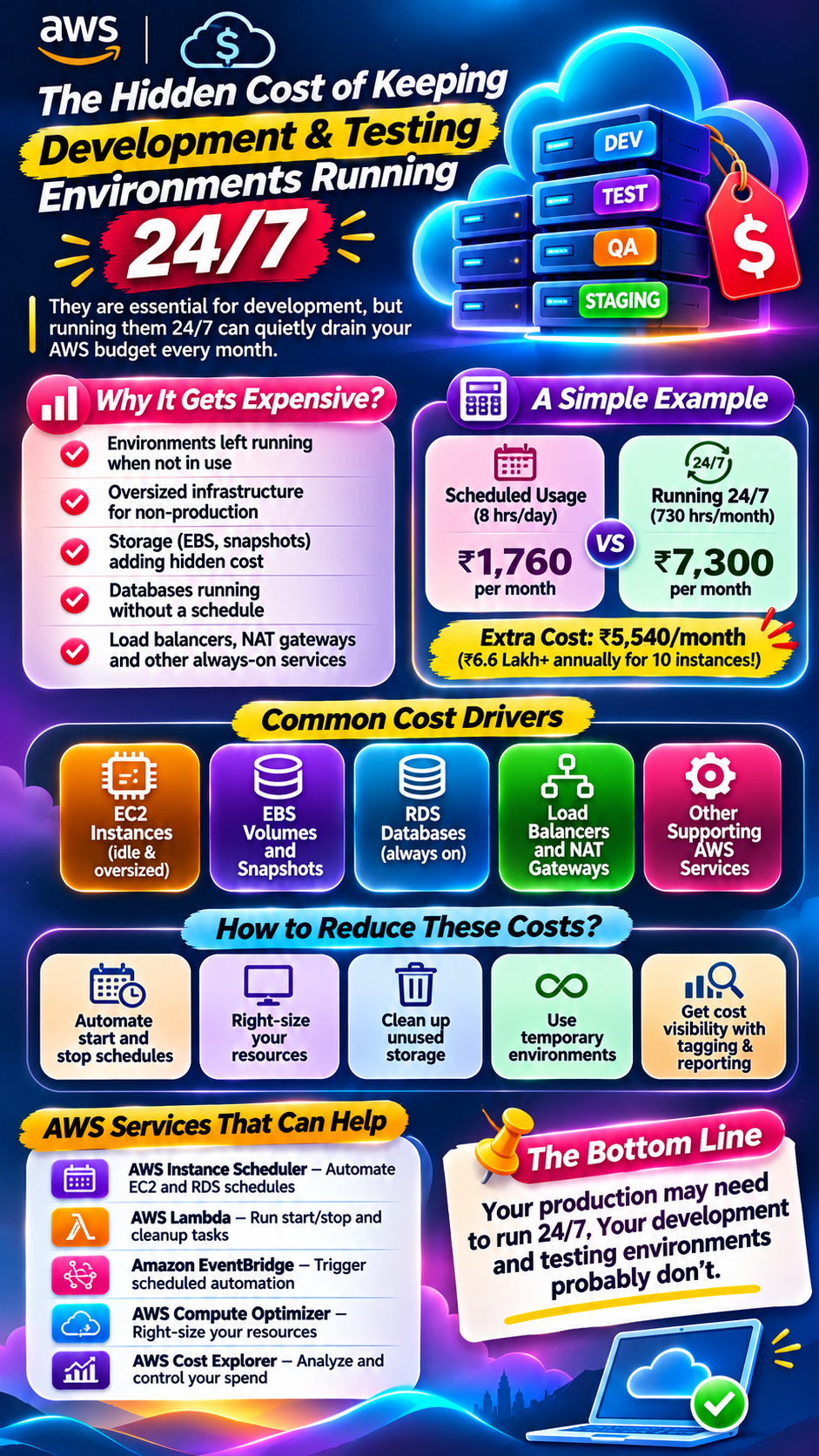
1. Why Development and Testing Environments Become Expensive
Development and testing environments are often created to support specific projects, releases or testing activities.
However, once deployed, they are frequently left running.
Consider a typical setup:
- A development team uses EC2 instances during working hours.
- A QA team runs automated tests on separate infrastructure.
- A staging environment remains available for release validation.
- Temporary testing servers are created for specific projects.
- Databases and storage resources continue operating in the background.
The problem is that these resources may continue consuming money even when the teams are offline.
For example, an EC2 instance running overnight, during weekends or over holidays can generate charges without delivering any meaningful business value.
Multiply that across multiple teams, projects and AWS accounts, and the unnecessary spending can become significant.
2. Where Is Your AWS Money Actually Going?
The cost of an idle environment is not limited to compute instances. Several supporting services may continue generating charges.
A. Idle Amazon EC2 Instances
EC2 instances are commonly used for development servers, test applications, build environments and staging workloads.
If an instance runs 24/7 but is only used for eight hours a day, the remaining time may represent avoidable compute expenditure.
B. Oversized Development Infrastructure
Not every development workload requires the same computing power as production.
Yet, teams sometimes use large instance types simply because they are convenient or were copied from production configurations.
The result? Paying for CPU and memory capacity that is rarely used.
C. Unused EBS Volumes and Snapshots
Stopping an EC2 instance does not automatically eliminate all associated storage charges.
EBS volumes can continue generating costs even when their attached instances are stopped.
Old snapshots, abandoned volumes and duplicate backups can also increase monthly storage expenditure.
D. Databases Running Without a Schedule
Development and testing databases may remain active overnight and throughout weekends.
Services such as Amazon RDS can generate costs while instances are running, even when there are very few database queries.
E. Load Balancers, NAT Gateways and Other Supporting Services
Even if application servers are stopped, supporting infrastructure may continue generating charges.
Depending on the architecture, this can include:
- Application Load Balancers
- NAT Gateways
- Elastic IP addresses
- CloudWatch monitoring
- Data transfer
- Other networking and storage resources
This is why simply stopping EC2 instances may not be enough to optimise a development environment.
3. A Simple Example: How Much Can an Idle Environment Cost?
Let's consider a hypothetical development environment.
Assume an EC2 instance costs ₹10 per hour and is required for only eight working hours per day.
Particulars| Amount
Hourly instance cost| ₹10
Daily usage| 8 hours
Actual monthly usage (22 working days)| 176 hours
Monthly cost with scheduled usage| ₹1,760
Monthly cost if running 24/7 (730 hours)| ₹7,300
Potential monthly difference| ₹5,540
<small>Illustrative calculation only. Actual AWS costs depend on instance type, AWS Region, pricing model, operating system, discounts and usage.</small>
Now imagine this setup across 10 development instances.
The potential difference becomes ₹55,400 per month, or ₹6,64,800 annually.
And this calculation considers only EC2 compute costs. It does not include storage, databases, networking or other supporting services.
The real question is not how much your cloud infrastructure costs. It is how much of that infrastructure actually needs to run.
4. How Can Businesses Reduce These Unnecessary AWS Costs?
The solution is not to shut down everything. Development and testing teams still need reliable infrastructure.
The goal is to make cloud resources available when required and minimise unnecessary usage when they are not.
Here are some practical approaches.
1. Implement Automated Start and Stop Schedules
Configure non-production resources to start during working hours and stop after the workday.
For example:
- Start: 9:00 AM
- Stop: 7:00 PM
- Weekends: Automatically stop unless required
AWS Instance Scheduler and Amazon EventBridge with AWS Lambda can help automate resource schedules.
2. Right-Size Your Development Resources
Analyse actual CPU, memory and utilisation patterns before selecting instance types.
AWS Compute Optimizer and Amazon CloudWatch can help identify opportunities to right-size resources.
A smaller instance may be sufficient for a development workload that does not experience production-level traffic.
3. Identify Unused Storage Resources
Regularly review:
- Unattached EBS volumes
- Old EBS snapshots
- Unused AMIs
- Abandoned test databases
- Duplicate backup resources
Use Amazon Data Lifecycle Manager and appropriate retention policies to manage storage lifecycle requirements.
Always verify ownership, backup requirements and recovery dependencies before deleting resources.
4. Introduce Environment Lifecycle Management
Not every testing environment needs to exist permanently.
Create temporary environments when required and automatically clean them up after a defined period.
For example, a QA environment created for a particular release can be scheduled for deletion once testing and approval are complete.
Infrastructure as Code tools such as AWS CloudFormation and Terraform can help teams create and remove environments consistently.
5. Establish Cloud Cost Visibility
Use AWS Cost Explorer and AWS Budgets to understand where money is being spent.
Apply consistent tags such as:
- Environment: Development / Testing / Staging
- Project: Project A / Project B
- Team: Engineering / QA
- Owner: Team or responsible individual
This helps organisations identify which teams and projects are driving unnecessary cloud expenditure.
5. AWS Services That Can Help Automate Cost Optimisation
AWS provides several services that can support better management of non-production infrastructure.
AWS Service| How It Helps
AWS Instance Scheduler| Automates EC2 and supported RDS instance schedules
Amazon EventBridge| Triggers scheduled automation
AWS Lambda| Executes resource start/stop and cleanup operations
AWS Cost Explorer| Analyses cloud expenditure
AWS Budgets| Sets cost thresholds and alerts
AWS Compute Optimizer| Provides resource right-sizing recommendations
Amazon CloudWatch| Monitors resource utilisation
AWS Systems Manager| Supports operational automation and resource management
The right combination depends on your infrastructure, workload requirements and operational policies.
6. Common Mistakes Businesses Should Avoid
Even organisations that actively monitor cloud costs can overlook some important details.
Stopping EC2 without checking attached resources: Storage and other associated services may continue generating costs.
Using the same configuration for every environment: Development, QA and production have different performance and availability requirements.
Ignoring weekend usage: Non-production environments may remain active for two days without being used.
Deleting resources without ownership checks: Removing a resource that a team still depends on can disrupt development or testing.
Automating without exceptions: Some teams may require overnight testing, continuous integration or always-available staging environments.
Cost optimisation should never compromise application reliability, testing quality or business continuity.
7. The Bigger Picture: Cloud Cost Optimisation Is an Ongoing Process
Reducing AWS expenditure is not a one-time activity.
As businesses grow, development teams create new environments, launch additional projects and introduce new testing requirements.
Without proper governance, these resources can accumulate over time.
A sustainable cloud cost optimisation strategy should include:
- Regular infrastructure audits
- Automated resource scheduling
- Usage-based right-sizing
- Clear resource ownership
- Cost allocation and reporting
- Continuous monitoring
- Defined resource cleanup policies
The objective is simple: make sure every cloud resource has a purpose, an owner and a reason to remain active.
Conclusion
Your production environment may need to run 24/7. Your development and testing environments probably don't.
Keeping non-production infrastructure running continuously can create unnecessary AWS expenditure that goes unnoticed for months.
By introducing automated scheduling, resource right-sizing, storage cleanup and better cost visibility, organisations can reduce waste while keeping development teams productive.
Did you find this helpful?