
Why Your AI Chatbot Gives Wrong Answers And How to Fix It | Savishty
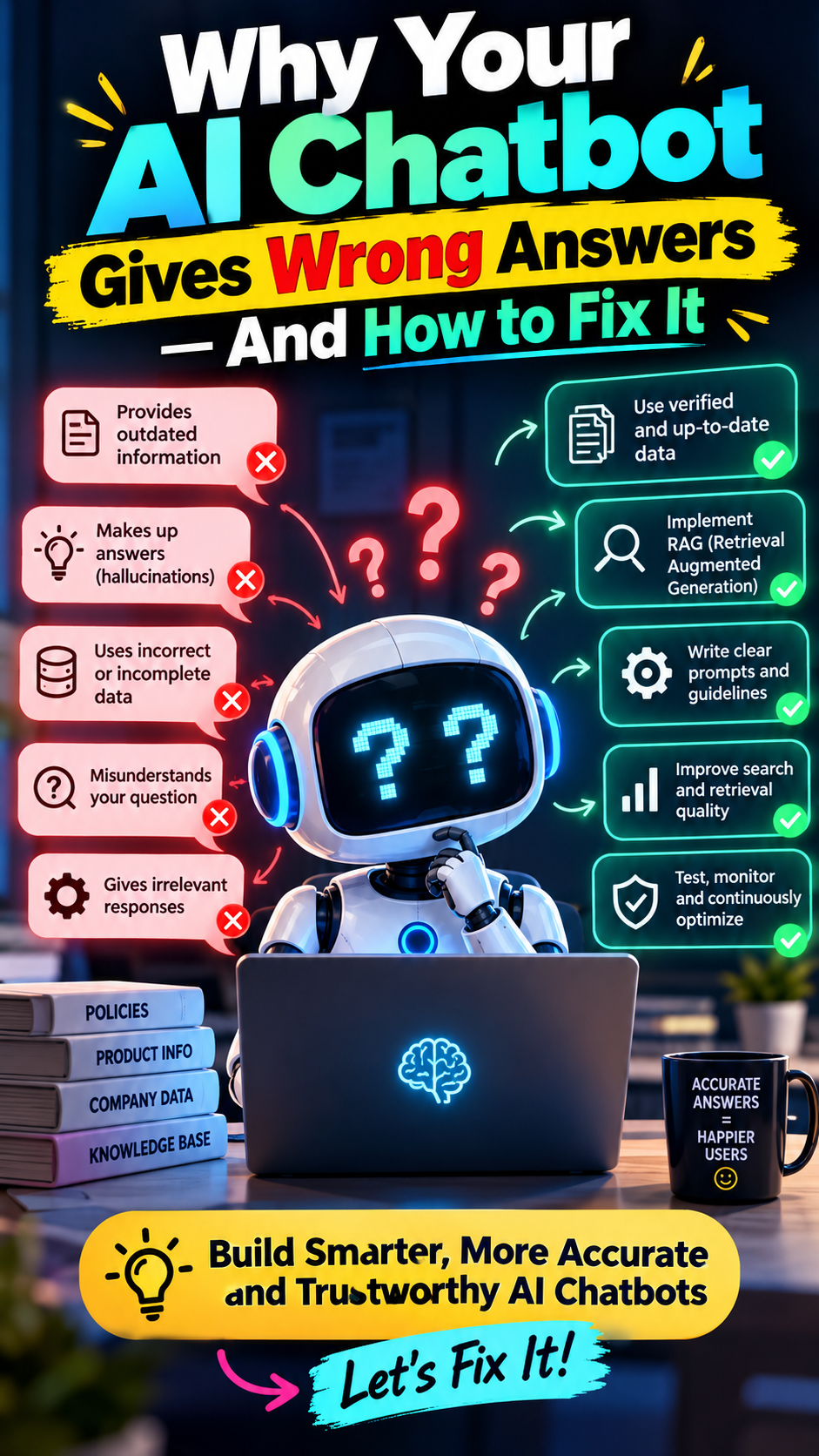
AI chatbots are transforming customer support, business operations, and enterprise workflows. From answering customer queries to helping employees find internal information, AI-powered assistants are becoming an essential part of modern businesses.
But there is one problem that many organizations discover after deployment: their AI chatbot sometimes gives confident, convincing, and completely wrong answers.
It might invent information, misunderstand a question, provide outdated details, or generate answers that have nothing to do with the company's actual policies.
These errors can frustrate customers, damage trust, and create serious business risks.
The good news? Most chatbot errors can be reduced with the right architecture, reliable data, effective retrieval systems, and continuous evaluation.
In this blog, we'll explore why AI chatbots give incorrect answers and how businesses can fix these problems using practical AI engineering techniques and cloud technologies.
1. Why Do AI Chatbots Give Wrong Answers?

Before fixing an AI chatbot, it's important to understand what's causing the problem.
1.1 AI Hallucinations
One of the most common problems is called an AI hallucination.
Large language models generate responses based on patterns learned during training. They do not automatically verify whether every statement they produce is factually correct.
When they lack sufficient information, they may generate plausible-sounding but inaccurate responses.
Example: A customer asks about a company's refund policy, and the chatbot invents a 30-day refund window even though the actual policy allows only 14 days.
How to fix it:
Ground responses in verified business information.
Instruct the model to acknowledge when it doesn't know an answer.
Require supporting evidence for factual claims.
Test the system with questions that have no answer in the available data.
The goal is not simply to make the chatbot sound intelligent. It's to make its answers more reliable.
1.2 Outdated or Incorrect Training Data
An AI chatbot may provide inaccurate information because its knowledge is incomplete, outdated, or inconsistent with current business requirements.
For example, a chatbot might recommend a discontinued product, quote an old subscription price, or explain a company policy that has already changed.
How to fix it:
Instead of relying exclusively on the model's pretrained knowledge, connect it to an up-to-date source of truth.
This could include:
Internal company documentation
Product catalogs and pricing databases
Customer support knowledge bases
Approved policy documents
APIs that retrieve real-time information
For frequently changing information, retrieving current data at the time of the query is generally more dependable than expecting the model to remember it.
1.3 Poorly Written Prompts
Sometimes the problem isn't the AI model itself. It's the instructions the model receives.
A vague prompt such as "Answer all customer questions helpfully" doesn't explain which sources to trust, what to do when information is missing, or when to escalate a request.
How to fix it: Define clear instructions that specify the chatbot's role, approved information sources, response boundaries, and fallback behavior.
For example:
Answer using only the information provided by approved company sources. If the information is missing or inconclusive, clearly state that you cannot verify the answer. Never invent policies, prices, product features, or commitments.
Prompt engineering helps establish boundaries, although prompts alone cannot guarantee factual accuracy.
2. The Biggest Fix: Use Retrieval-Augmented Generation (RAG)

One of the most effective ways to improve chatbot accuracy is through Retrieval-Augmented Generation (RAG).
RAG allows an AI chatbot to retrieve relevant information from an external knowledge source before generating an answer. Instead of relying entirely on what the model learned during training, the system provides relevant documents as context for its response.
How RAG works
1. User asks a question
“What is our current refund policy?”
2. Retrieve relevant information
Search approved policies, documents, or a knowledge base.
3. Generate a grounded answer
Provide the model with relevant evidence and clear instructions.
4. Return the answer with sources
Show the verified policy and a reference to its source.
For example, if a company updates its refund policy, the knowledge base can be updated so the chatbot retrieves the new information rather than relying on outdated model knowledge.
AWS provides Amazon Bedrock Knowledge Bases to help implement managed RAG workflows, including information retrieval and response generation with source citations.

Amazon Bedrock
+1
Important: RAG reduces the risk of hallucinations, but it doesn't eliminate them. If the retrieval system finds irrelevant documents or misses essential information, the generated answer can still be incorrect.
3. Improve Your Knowledge Base and Document Quality
Even a powerful AI model cannot reliably answer questions using incomplete, contradictory, or poorly structured information.
Imagine uploading hundreds of company PDFs, product manuals, and policy documents into a chatbot. If the documents contain duplicate information, outdated policies, or badly formatted tables, the chatbot may retrieve the wrong details.
How to fix the problem
Remove outdated documents: Ensure expired policies and discontinued product information are no longer treated as authoritative.
Clean your data: Fix formatting issues, duplicate records, broken tables, and missing sections.
Use logical document chunks: Split long documents into meaningful sections rather than arbitrary fragments.
Preserve metadata: Store details such as document title, version, department, and last-updated date.
Establish a source of truth: Define which document or database takes priority when information conflicts.
For technical manuals or documents with complex structures, advanced parsing and chunking strategies can improve retrieval quality. AWS recommends testing different configurations for the specific use case instead of assuming one approach will work for every knowledge base.
AWS re:Post
+1
4. Fix Poor Retrieval and Search Results
Sometimes the correct answer exists in your knowledge base, but the chatbot still gives the wrong response.
Why? Because the retrieval system may not find the right information.
For example, a user asks:
"How can I reset my company's cloud access credentials?"
The knowledge base contains the correct procedure, but the search retrieves a general password policy instead.
The model then generates a response based on information that is related to the question but doesn't actually answer it.
Practical ways to improve retrieval
Use hybrid search. Combine semantic search, which identifies meaning, with keyword search, which matches exact terms. This can help when queries contain technical terminology, product IDs, error codes, or specific policy names.
Optimize chunk sizes. Very small chunks may lose important context, while very large chunks may introduce irrelevant information.
Use reranking. A reranking model can reorder initial search results so the most relevant passages are prioritized.
Apply metadata filters. Filter by department, product version, region, or document status where appropriate.
Measure retrieval quality independently. Check whether the correct documents are retrieved before investigating the model's generated answer.
AWS recommends evaluating context relevance and context coverage to understand whether the retrieval stage is working effectively.

Artificial Intelligence
+1
5. Choose the Right AI Model for Your Use Case
Not every AI model performs equally well on every task.
One model may excel at conversational responses, while another may perform better at technical reasoning, structured output, or following detailed instructions.
Choosing a model solely because it is popular or inexpensive can lead to disappointing results.
What should businesses consider?
Requirement
What to evaluate
Factual accuracy
Does the model provide correct answers using available evidence?
Reasoning
Can it handle multi-step technical or business questions?
Instruction following
Does it respect system prompts and response boundaries?
Latency
Does it respond quickly enough for the application?
Cost
Is the quality worth the cost per request?
Security
Does the solution meet organizational data and access requirements?
The best approach is to test multiple suitable models against the same set of real-world questions and compare the results.
On AWS, Amazon Bedrock provides access to foundation models from multiple providers, allowing teams to evaluate models for their particular application.
Amazon Bedrock
+1
6. Make Your Chatbot Admit When It Doesn't Know
A trustworthy chatbot should not answer every question simply because a user expects a response.
In some cases, the most accurate answer is that the available information is insufficient.
For example, if an employee asks about an unannounced policy change, the chatbot should not invent a policy to sound helpful.
Implement a confidence and fallback strategy
Your application can use retrieval scores, evidence checks, business rules, or calibrated confidence estimates to determine whether an answer should be generated.
A practical workflow is:
Retrieve information relevant to the question.
Check whether the retrieved evidence is sufficient.
Generate an answer only when the evidence supports it.
Provide source references for important factual claims.
Ask a clarifying question or escalate to a human when the evidence is insufficient.
Avoid relying on a model's self-reported confidence alone. A model can sound certain while being wrong.
For sensitive workflows, such as financial decisions, access management, or legal and compliance questions, additional verification and human review may be necessary.
7. Test Your Chatbot Before and After Deployment

A chatbot that works well in a demonstration may fail when real users ask ambiguous questions, use unfamiliar terminology, or request information that is missing from the knowledge base.
That is why chatbot evaluation should be continuous, not a one-time activity.
Build a chatbot evaluation dataset
Create a collection of realistic test questions covering:
Frequently asked questions
Complex technical questions
Ambiguous user requests
Questions with outdated or conflicting information
Questions that cannot be answered from available sources
Attempts to make the chatbot ignore its instructions
Questions involving confidential or restricted information
For each test, compare the generated response with the expected answer and supporting evidence.
Key metrics to track
Metric
What it measures
Answer correctness
Whether the answer is factually correct
Faithfulness
Whether the answer is supported by retrieved evidence
Context relevance
Whether the retrieved information is relevant
Completeness
Whether the response covers the important parts of the question
Citation accuracy
Whether the cited sources actually support the claims
Response latency
How long the chatbot takes to respond
Escalation rate
How often questions require human assistance
AWS offers evaluation capabilities through Amazon Bedrock to assess model performance and RAG quality using automated metrics and human feedback.
Amazon Bedrock
+1
The key is to use evaluation results to identify the source of the error. If retrieval is poor, improve search and document processing. If retrieval is good but answers are inaccurate, investigate prompting, model selection, and generation settings.
8. How to Build a More Reliable AI Chatbot on AWS
For organizations building enterprise AI assistants, AWS provides services that can support different parts of the chatbot architecture.

Amazon Bedrock
Use foundation models to generate responses, with model selection based on your quality, latency, and cost requirements.

Amazon S3
Store source documents, approved knowledge files, and supporting datasets for your application.
![[アップデート] Amazon OpenSearch Service データ探索とコラボレーションを強化する次世代UIを試してみた | DevelopersIO](https://images.openai.com/static-rsc-4/dSsAOi5U9OXjFKh1BQOGvX5HCEV4_ltEsznv4NW2-b7Qs73X2EakHYFh6khKUV4ugPghk-WOSP39uqnJTzbyoiGe3A80iDbc4rMPArlNH9tBWJSOa_MXcQn_zCTOzWqXMDL6AC5qjH3CsZMag2E6JNvSgFyrkfoPRJdSh4iaKiY?purpose=inline)
Amazon OpenSearch Service
Support search and retrieval architectures, including vector search, depending on the solution design.

Amazon CloudWatch
Monitor application logs, latency, errors, and operational performance using appropriate instrumentation.
A typical implementation could follow this sequence:
Collect and clean the organization's approved documents.
Store source data in a suitable storage system.
Configure a knowledge base and retrieval pipeline.
Connect retrieval to a foundation model through Amazon Bedrock.
Add source references, fallback behavior, and access controls.
Evaluate retrieval and generated answers against representative test cases.
Monitor production performance and update the knowledge base as information changes.
The exact services depend on the application. For example, a managed knowledge base may reduce the amount of custom retrieval infrastructure required, while a specialized application may need a custom search pipeline.
Security is equally important. Apply permissions to the underlying documents and ensure the chatbot retrieves only information that the requesting user is authorized to access. Guardrails can add another layer of protection, but they should not replace access controls or application-level validation.
9. Common Mistakes to Avoid When Fixing AI Chatbots
Here are some common approaches that can fail to solve the real problem:
Switching models immediately: The issue may be poor retrieval or incorrect source data rather than model capability.
Adding more documents without cleaning existing data: More content does not automatically mean better answers.
Increasing prompt complexity indefinitely: Clear instructions help, but they cannot compensate for missing evidence.
Assuming RAG guarantees accuracy: Retrieval can return irrelevant, incomplete, or outdated information.
Skipping regression testing: A change that fixes one question may break another.
Ignoring user feedback: Real-world failures often reveal gaps that synthetic test cases miss.
Treating monitoring as optional: Accuracy can deteriorate as documents, user behavior, and application requirements change.
The best results usually come from identifying the failure point and making targeted improvements rather than repeatedly changing the model.
Conclusion: Build AI Chatbots That Users Can Trust
An AI chatbot giving wrong answers is not always a sign that the underlying model is bad. The problem may lie in outdated information, poor prompts, weak retrieval, inadequate evaluation, or missing safeguards.
The solution is to treat the chatbot as a complete system rather than just a language model.
Start with reliable data. Introduce retrieval-augmented generation where appropriate. Improve search quality. Require evidence for factual responses. Give the chatbot a safe way to decline uncertain questions. Finally, test performance continuously and investigate failures systematically.
For businesses deploying AI assistants at scale, accuracy is not just about generating better answers. It's about building an architecture that helps the system find, verify, and communicate the right information.
With a well-designed RAG pipeline, appropriate AWS services, and continuous evaluation, organizations can build AI chatbots that are more useful, reliable, and trustworthy.
Did you find this helpful?