Edge Computing on AWS: What Should Run Near the User? | Savishty
ntroduction: Why Is Everything Moving Closer to the User?
Imagine a customer opening your application, clicking a button, and waiting several seconds for a response. Or picture a smart factory where a machine must stop immediately when a sensor detects a problem.
In both situations, every millisecond matters.
Traditional cloud computing processes most workloads in centralized data centers. While this model works well for many applications, sending every request to a distant server can introduce latency, increase bandwidth costs, and create challenges for applications that need to operate with limited connectivity.
That is where edge computing on AWS comes in.
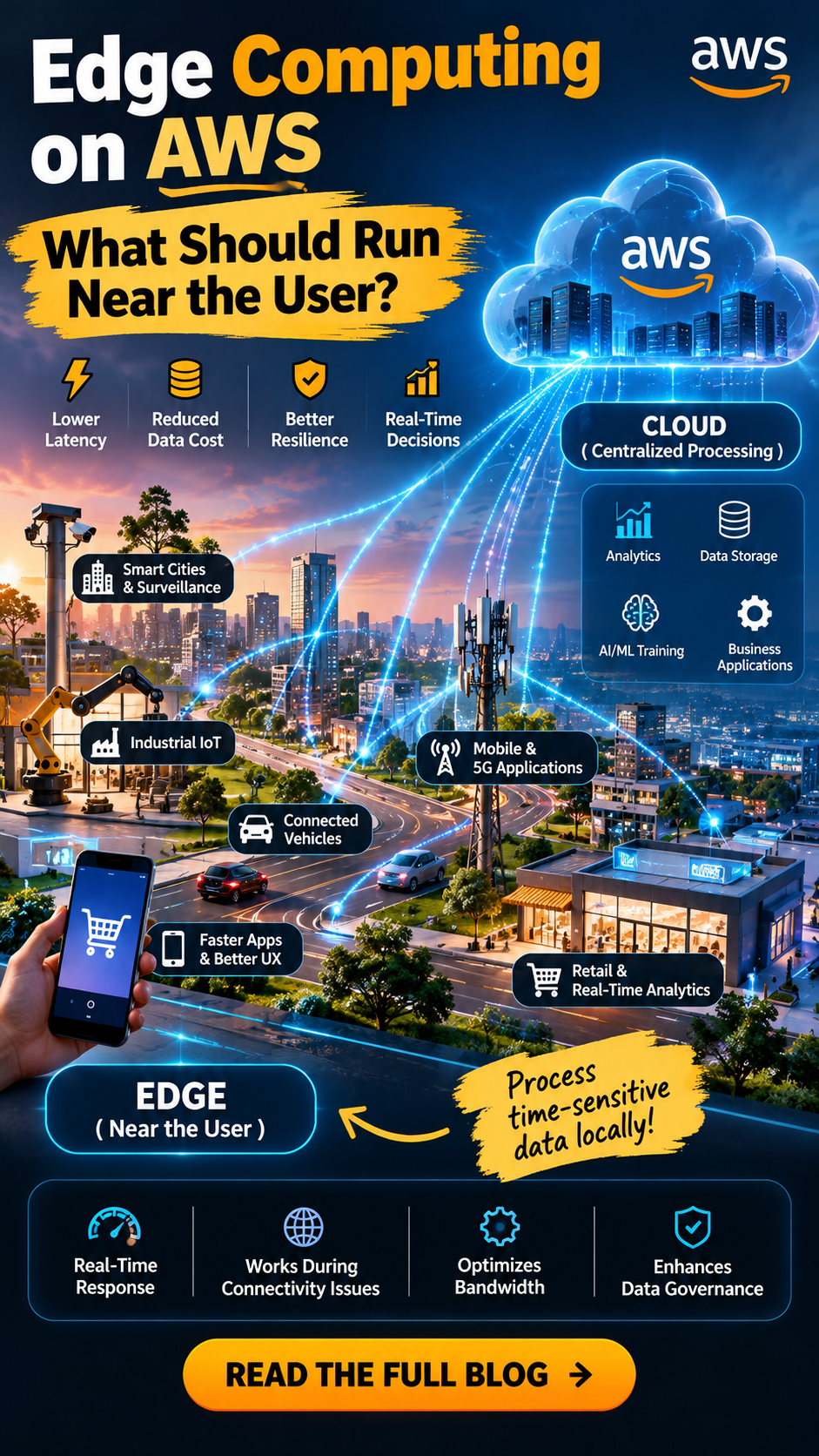
Edge computing brings computing, storage, and application services closer to the users, devices, and locations where data is generated. Instead of sending everything to a central cloud region, businesses can process time-sensitive data near its source and use AWS cloud infrastructure for centralized processing, analytics, and management.
But here is the important question: What should actually run at the edge, and what should stay in the cloud?
Let's explore how to make that decision using AWS services and real-world use cases.
What Is Edge Computing on AWS?
Edge computing is an architecture in which data processing happens closer to the point where data is created or consumed.
AWS supports edge computing through services and infrastructure designed for different environments, including:
Amazon CloudFront: Delivers websites, APIs, videos, and other content through a globally distributed content delivery network.
AWS Lambda@Edge: Runs supported Lambda functions at CloudFront edge locations for use cases such as request routing, personalization, and response customization.
Amazon CloudFront Functions: Handles lightweight, latency-sensitive operations such as URL rewrites, header manipulation, and request validation.
AWS IoT Greengrass: Supports local processing and messaging for connected devices, including workloads that must continue operating when cloud connectivity is interrupted.
AWS Outposts: Brings AWS infrastructure and services into customer premises for workloads requiring local processing or proximity to on-premises systems.
AWS Local Zones: Places selected AWS compute and other services closer to major population centers to support latency-sensitive applications.
AWS Wavelength: Integrates AWS services with supported telecommunications networks for applications that benefit from proximity to mobile users.
These services serve different purposes. A content delivery edge is not the same as an industrial edge device or a local cloud deployment.
The right choice depends on your application's latency requirements, data volume, connectivity, security needs, and operating environment.
Why Does Edge Computing Matter?
1. Lower Latency
When an application needs an immediate response, routing every request to a distant region may introduce unnecessary network delays.
Processing selected workloads closer to the user can reduce response time.
Examples include real-time gaming, interactive applications, industrial control systems, and connected devices.
2. Reduced Bandwidth Consumption
IoT devices, cameras, and industrial sensors can generate enormous amounts of data.
Transmitting every raw data point to the cloud may consume significant bandwidth and increase costs.
Edge processing can filter, aggregate, compress, or analyze data locally before sending only relevant information to AWS.
3. Better Resilience During Connectivity Issues
Some edge applications must continue functioning even when their internet connection becomes unstable.
For example, a manufacturing facility may need local monitoring and control to continue during a temporary cloud connectivity outage.
With an appropriately designed local architecture, essential operations can continue while data is buffered and synchronized when connectivity returns.
4. Improved Data Governance
Certain applications must process sensitive information close to where it originates.
Local processing can help reduce the amount of personal, operational, or confidential data transmitted elsewhere. However, edge computing does not automatically guarantee regulatory compliance; access controls, encryption, retention policies, and applicable regulations still matter.
What Should Run Near the User?
The most effective edge architecture does not move every workload to the edge. It moves only the functions that benefit meaningfully from being close to users or devices.
Here are five workloads worth considering.
1. Content Delivery and Lightweight Request Processing
Best for: Websites, streaming platforms, APIs, and globally distributed applications.
If users access your application from different countries, serving static content from a nearby edge location can reduce download times and improve responsiveness.
Amazon CloudFront caches eligible content closer to users, reducing repeated requests to the origin server.
CloudFront Functions can handle lightweight request transformations, while Lambda@Edge supports more complex request and response processing in supported execution phases.
Example: An e-commerce platform can deliver product images, CSS, JavaScript, and cached catalog content through CloudFront. It can also personalize supported requests or redirect users based on request attributes.
Keep in the cloud: Order processing, payment authorization, inventory transactions, and other operations requiring authoritative business data and transactional consistency.
2. IoT Data Processing
Best for: Smart factories, connected vehicles, agriculture, energy systems, and industrial monitoring.
IoT environments often generate more data than they need to transmit continuously to the cloud.
AWS IoT Greengrass can support local messaging, processing, and selected application components on edge devices.
Example: A factory uses temperature and vibration sensors to monitor production equipment. A local edge application detects abnormal readings and triggers an immediate alert without waiting for a round trip to a distant cloud service.
The device can send summaries, anomalies, and historical data to AWS for long-term analysis and reporting.
Keep in the cloud: Fleet-wide analytics, model training, centralized dashboards, and cross-site reporting.
3. Real-Time Video Analytics
Best for: Retail analytics, manufacturing inspection, traffic monitoring, and security systems.
Video produces large volumes of data. Uploading every frame to a remote region may be expensive or impractical when decisions must happen quickly.
An edge device can run supported computer vision workloads locally, identify relevant events, and send selected clips or metadata to the cloud.
Example: A manufacturing camera detects a defective product on a conveyor belt. The local system flags the item immediately, while AWS stores event records and aggregates defect statistics across production lines.
Keep in the cloud: Centralized reporting, historical trend analysis, model training, and long-term storage where appropriate.
4. Low-Latency Applications for Mobile Users
Best for: Interactive mobile applications, cloud gaming, media processing, and selected augmented reality workloads.
For certain applications, network distance between users and application servers can have a noticeable effect on responsiveness.
AWS Local Zones and AWS Wavelength may help place supported compute workloads closer to end users or mobile networks.
Example: A media application performs time-sensitive processing in a nearby supported infrastructure location while storing user accounts, billing information, and broader application data in a central AWS Region.
The architecture must still account for network routing, service availability, and the latency introduced by communication between edge and cloud components.
Keep in the cloud: Shared business services, centralized identity management, durable data storage, and workloads that do not require geographic proximity.
5. Local Processing for Remote or Disconnected Environments
Best for: Remote industrial sites, ships, field operations, and facilities with unreliable connectivity.
Some applications cannot assume a continuous connection to AWS.
Local infrastructure can handle essential processing and temporarily store data until the connection becomes available again.
Depending on the use case, AWS IoT Greengrass, AWS Outposts, or purpose-built local infrastructure may be appropriate.
Example: A remote facility collects operational telemetry throughout the day. Local systems monitor equipment, record events, and queue data for synchronization with AWS when the network recovers.
Keep in the cloud: Centralized management, cross-location analytics, backups, and organization-wide reporting.
Edge vs. Cloud: Where Should Each Workload Run?
WorkloadRecommended locationAWS optionsStatic website assetsEdgeAmazon CloudFrontLightweight request logicEdgeCloudFront FunctionsSupported request personalizationEdgeLambda@EdgeLocal IoT processingDevice or local edgeAWS IoT GreengrassIndustrial applications needing local infrastructureOn-premises or nearbyAWS Outposts, suitable local infrastructureLatency-sensitive regional applicationsNearby AWS infrastructureAWS Local ZonesSelected mobile-network workloadsTelecom edgeAWS WavelengthLarge-scale analyticsCloudAmazon S3, AWS analytics servicesModel trainingUsually cloudAmazon SageMaker and other suitable compute servicesCentralized business transactionsUsually cloudAppropriate AWS compute and database services
These are starting points, not strict rules. Some workloads span multiple locations, and AWS service availability and feature support vary by region and deployment environment.
A Practical AWS Edge Computing Architecture
Consider a smart retail chain with stores in multiple cities.
A practical design could combine edge processing with centralized cloud services.
Step 1: Collect data locally
Cameras, sensors, and point-of-sale systems generate operational events.
Step 2: Process time-sensitive events at the edge
Local systems filter sensor readings, detect selected events, and trigger immediate operational alerts.
Step 3: Deliver customer-facing content efficiently
Amazon CloudFront serves eligible static content and cached resources to users from nearby edge locations.
Step 4: Send relevant data to AWS
Stores transmit selected events, aggregated metrics, and required records to centralized cloud services.
Step 5: Analyze data centrally
Cloud-based analytics identify patterns across stores, support reporting, and help teams make business decisions.
Step 6: Monitor and update deployments
Security policies, software updates, logging, and fleet management help maintain consistent operations across distributed locations.
The key principle is simple: process urgent information locally, but centralize the workloads that benefit from shared data, large-scale computing, and organization-wide visibility.
How to Decide What Belongs at the Edge
Before moving a workload closer to users, ask these six questions.
1. Is latency genuinely a problem?
Measure actual end-to-end latency and identify where delays occur. Moving computation closer will not fix every performance bottleneck.
2. Does the application need to operate offline?
If essential functions must continue during network outages, consider local processing, data buffering, and recovery behavior.
3. How much data does the workload generate?
If transmitting raw data is expensive, edge filtering and aggregation may offer substantial benefits.
4. What are the security requirements?
Edge deployments introduce additional devices, locations, credentials, software updates, and physical security concerns.
5. How difficult will distributed operations become?
A fleet of hundreds of edge devices may require automated provisioning, monitoring, patching, and configuration management.
6. Does edge computing justify its cost?
Compare the cost of local hardware, connectivity, operations, and cloud services against the benefits of reduced latency, lower data transfer, and improved resilience.
The goal is not to put as much computing as possible at the edge. It is to put the right computing in the right place.
Common Edge Computing Mistakes to Avoid
Moving Everything to the Edge
Distributed deployments increase operational complexity. Keep centralized workloads in the cloud when proximity provides little measurable benefit.
Ignoring Network Dependencies
An edge application may still depend on cloud authentication, configuration, databases, or external APIs. Identify which functions remain available when those dependencies fail.
Underestimating Security
Edge devices may operate in locations with limited physical protection. Use strong device identities, least-privilege permissions, encryption, secure updates, and appropriate monitoring.
Overlooking Data Synchronization
Local data must often be reconciled with central systems. Plan for duplicate events, intermittent connections, conflicts, and recovery after outages.
Choosing Services Before Defining Requirements
Do not select CloudFront, Greengrass, Outposts, Local Zones, or Wavelength simply because they are AWS edge offerings. Start with measurable requirements, then select the service that addresses them.
The Future of Edge Computing on AWS
As AI, IoT, automation, and real-time applications continue to develop, edge computing will play an increasingly important role in modern application architectures.
Organizations are looking for ways to process data closer to its source, respond faster to events, reduce unnecessary data transfers, and maintain operations across distributed environments.
The opportunity is not to replace cloud computing. It is to combine centralized cloud capabilities with local processing where proximity provides a clear advantage.
AWS provides multiple options for building this hybrid architecture, from globally distributed content delivery to local IoT processing and infrastructure deployed closer to users.
Final Thoughts
Edge computing on AWS is about making smarter decisions about where workloads run.
If a task requires an immediate response, generates large volumes of local data, or must continue during connectivity disruptions, edge processing may be the right choice.
If a workload needs centralized analytics, shared business data, large-scale training, or durable organization-wide storage, the cloud is often the better fit.
For many organizations, the strongest architecture is a combination of both.
The real question is not whether to choose edge or cloud. It is which parts of your application need to be close to the user, and which parts benefit from staying centralized?
Answer that question with real latency measurements, business requirements, and cost analysis, and you can build an AWS architecture that is faster, more resilient, and more efficient.
Did you find this helpful?