AWS Organizations Explained: How Enterprises Manage Multiple Accounts | Savishty
AWS Organizations Explained: How Enterprises Manage Multiple Accounts
Managing one AWS account is relatively simple. But what happens when your business has 10, 50, or even 100 AWS accounts?
As businesses expand their cloud infrastructure, managing multiple AWS accounts becomes increasingly challenging.
Different teams may use different AWS services, deploy applications across multiple environments, manage separate budgets, and follow different security practices.
Without centralized governance, organizations can struggle with inconsistent permissions, limited cost visibility, security gaps, and operational complexity.
This is where AWS Organizations becomes important.
AWS Organizations helps businesses centrally manage multiple AWS accounts, organize workloads, apply security policies, and simplify billing through a single organizational structure.
But how does it actually work? And why do large enterprises use it to manage their cloud environments?
Let's explore.
1. What Is AWS Organizations?
AWS Organizations is a cloud management service that allows businesses to manage multiple AWS accounts centrally.
Instead of managing every account independently, an organization can bring its AWS accounts under one management structure.
This makes it easier to control access, establish security policies, organize workloads, and manage billing.
For example, imagine an enterprise operating several business units:
Finance and accounting applications.
Customer-facing applications.
Development and testing environments.
Data analytics platforms.
Production infrastructure.
Security and monitoring systems.
Rather than placing everything inside one AWS account, the company can create separate accounts for different workloads and manage them through AWS Organizations.
This provides better isolation and centralized governance.
In simple terms: AWS Organizations gives enterprises a structured way to manage multiple AWS accounts without losing control over security, operations, and costs.
2. Why Do Enterprises Need Multiple AWS Accounts?
A common mistake businesses make is running all their applications, databases, development environments, and production workloads inside one AWS account.
This may work for a small project, but it can become difficult to manage as the business grows.
Multiple AWS accounts offer several advantages.
1. Better Security Isolation
Different workloads can have separate security boundaries.
For example, production applications can operate in one account while development and testing environments run in another.
This reduces the risk of accidental changes affecting critical business applications.
2. Improved Cost Visibility
Separate accounts make it easier to identify which department, application, or business unit is generating cloud expenses.
For example, a company can track spending separately for its data analytics, development, and production environments.
3. Independent Resource Management
Different engineering teams can manage their workloads without requiring unrestricted access to every other team's resources.
4. Better Compliance Management
Businesses operating in regulated industries may need separate controls for sensitive workloads, data access, and operational environments.
Multiple accounts help establish these boundaries.
5. Easier Business Expansion
As a company launches new products, services, or business units, it can create additional AWS accounts without redesigning its entire cloud environment.
AWS recommends using multiple accounts as environments grow in size and complexity. Official AWS guidance.
3. How Does AWS Organizations Work?
AWS Organizations uses a hierarchical structure to organize and manage accounts.
The main components include:
A. Management Account
The management account is the primary account used to create and administer an AWS organization.
It can:
Create new member accounts.
Invite existing AWS accounts.
Create organizational units.
Attach organization policies.
Manage consolidated billing.
Enable integrations with supported AWS services.
Assign delegated administrators.
It is important to protect this account because it has significant organizational privileges.
AWS recommends keeping normal business workloads out of the management account and restricting access to highly trusted administrators.
B. Member Accounts
Member accounts are individual AWS accounts that belong to the organization.
Each account provides its own environment for managing resources, permissions, applications, and workloads.
For example:
Production Account
Development Account
Testing Account
Data Analytics Account
Security Account
Backup Account
This separation helps businesses manage different workloads independently.
C. Organizational Units (OUs)
Organizational Units are logical groups of AWS accounts.
Instead of managing 50 accounts individually, businesses can group accounts based on their security requirements and operational purpose.
For example:
Production OU
Non-Production OU
Security OU
Infrastructure OU
Sandbox OU
Organizations can attach policies to these OUs and apply common governance controls to the accounts beneath them.
D. Root
The root is the top-level container in an AWS organization.
It contains the organizational units and accounts within the organization.
Policies attached at the root can apply across the organization, depending on the policy type.
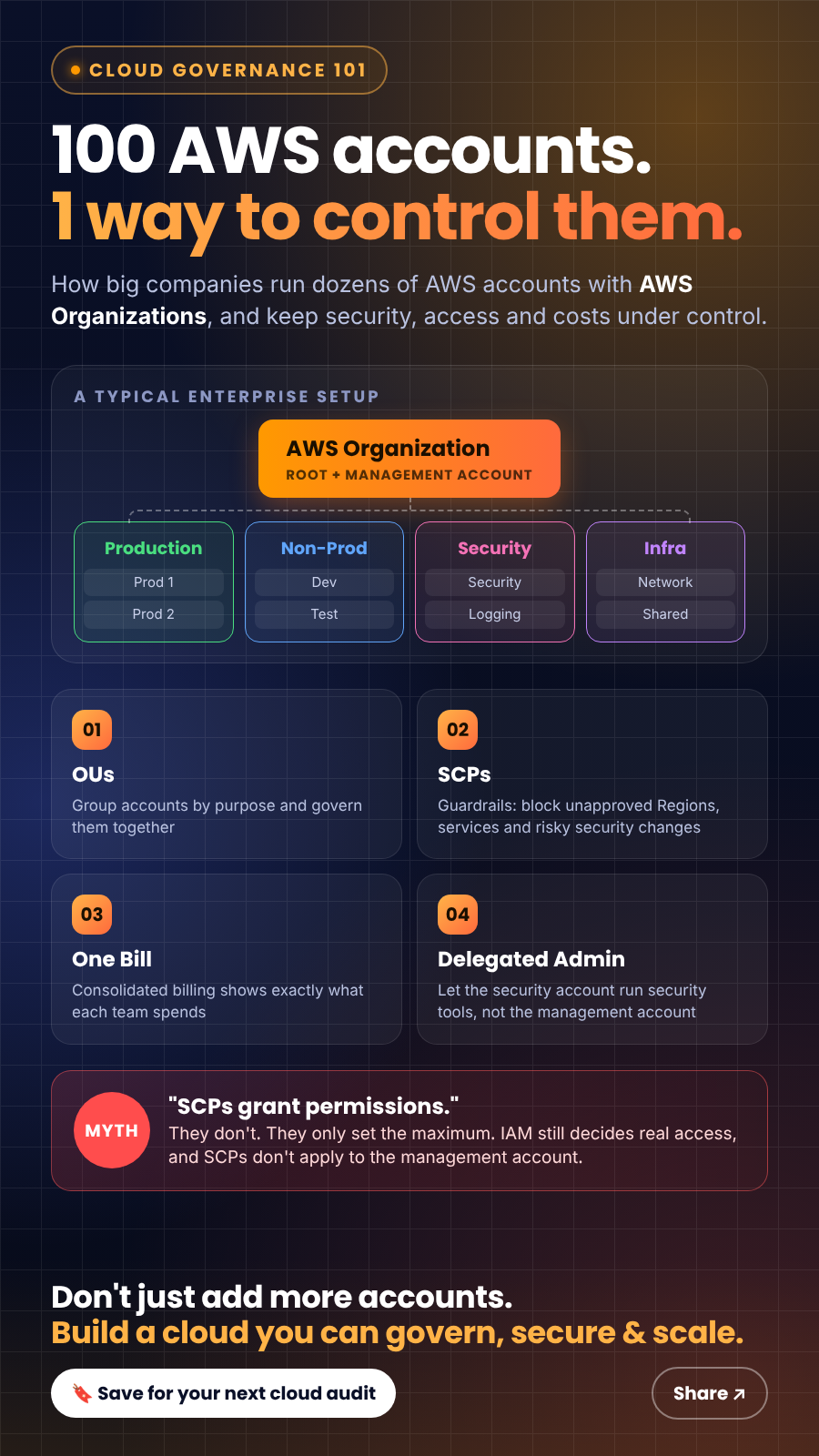
Example structure:
AWS Organization
Management Account
Production OU
Production Account 1
Production Account 2
Non-Production OU
Development Account
Testing Account
Security OU
Security Account
Logging Account
Infrastructure OU
Network Account
Shared Services Account
This structure allows enterprises to organize their cloud environments logically rather than managing every account separately.
4. What Are Service Control Policies (SCPs)?
One of the most important features of AWS Organizations is Service Control Policies.
SCPs help organizations define the maximum permissions available to users and roles in member accounts.
For example, a company may want to prevent teams from disabling certain security services or using AWS Regions that are not approved by its cloud governance team.
An SCP can establish these restrictions centrally.
Practical examples of SCPs
1. Restricting AWS Regions
An organization may restrict workloads to approved AWS Regions based on regulatory or business requirements.
2. Preventing Security Changes
An organization can restrict certain actions that could disable important security controls.
3. Restricting Unapproved Services
Businesses can limit the use of selected AWS services where appropriate.
4. Protecting Organizational Resources
Policies can prevent member accounts from leaving the organization or closing themselves, where the relevant controls are configured.
Important: SCPs Do Not Grant Permissions
An SCP does not automatically give a user permission to access an AWS service.
Instead, it defines the maximum permissions available to principals in affected member accounts.
Actual access still depends on applicable IAM permissions and other authorization controls.
Also, SCPs do not restrict principals in the management account.
This is one reason why protecting the management account is so important.
5. How AWS Organizations Simplifies Cloud Billing
Managing multiple AWS accounts can create billing complexity.
Imagine an enterprise with 25 AWS accounts.
Each account may generate charges for:
Amazon EC2
Amazon S3
Amazon RDS
AWS Lambda
Amazon CloudWatch
Data transfer
Other AWS services
Without centralized billing, finance teams may need to review multiple billing accounts separately.
AWS Organizations supports Consolidated Billing, allowing charges from member accounts to be combined into a single bill for the organization.
Key benefits include:
One consolidated bill.
Better visibility across accounts.
Easier cost allocation.
Simplified financial administration.
Potential sharing of eligible pricing benefits and discounts, subject to AWS billing rules.
For example, an enterprise can identify how much its development, production, and analytics environments are costing.
This makes it easier for finance and engineering teams to understand cloud spending.
However, consolidated billing does not automatically optimize cloud costs. Businesses still need cost monitoring, resource optimization, and budgeting practices.
6. What Is a Delegated Administrator in AWS Organizations?
As organizations grow, managing every AWS service from the management account can become difficult.
This is where delegated administration helps.
A delegated administrator is a member account that is assigned administrative responsibilities for a supported AWS service or specific Organizations functions.
For example, an enterprise can assign a security account to manage certain security services across its AWS organization.
Similarly, a dedicated account can handle centralized monitoring or compliance-related responsibilities.
Why is delegated administration useful?
Reduces dependency on the management account.
Separates administrative responsibilities.
Supports centralized service management.
Improves operational organization.
Helps follow the principle of least privilege.
For example, the security team can manage supported security services from a dedicated security account without requiring everyday access to the management account.
Delegated administration must be configured for the relevant supported service and does not automatically provide unrestricted organization-wide permissions.
7. AWS Organizations vs AWS Control Tower: What's the Difference?
Many businesses confuse AWS Organizations with AWS Control Tower.
Both help manage multi-account AWS environments, but they serve different purposes.
FeatureAWS OrganizationsAWS Control TowerPrimary purposeCentralized account management and governanceEstablishing and governing a multi-account environmentAccount organizationYesUses AWS OrganizationsOrganizational UnitsYesYesService Control PoliciesYesUses policies as part of governanceConsolidated BillingYesUses AWS Organizations billing capabilitiesAccount provisioningSupports account creationProvides a more guided account-provisioning experienceGovernancePolicy-based controlsLanding zone and predefined governance capabilitiesBest suited forManaging organizational account structuresSetting up and governing standardized multi-account environments
When should businesses use AWS Organizations?
Choose AWS Organizations when you need centralized account management, consolidated billing, organizational units, and policy-based governance.
When should businesses consider AWS Control Tower?
Consider AWS Control Tower when you want a guided way to establish a multi-account AWS environment with standardized account provisioning and governance.
Important: AWS Control Tower uses AWS Organizations as a foundational component. It is not a replacement for AWS Organizations.
8. How to Set Up AWS Organizations: A Practical Overview
Setting up AWS Organizations requires planning, especially when managing enterprise workloads.
Here is a simplified implementation approach.
Step 1: Create an Organization
Start by creating an organization from the AWS account that will serve as the management account.
Enable the recommended all-features mode if you need centralized policies and integrations with supported AWS services.
Step 2: Create Organizational Units
Design OUs based on common security and operational requirements.
For example:
Production
Non-Production
Security
Infrastructure
Sandbox
Avoid creating too many OUs without a clear governance purpose.
Step 3: Add Member Accounts
Create new AWS accounts or invite existing accounts to join the organization.
Assign accounts to the appropriate OUs.
Step 4: Configure Service Control Policies
Establish organization-wide guardrails.
Examples include approved Region restrictions, security protections, and limitations on selected services.
Test policies carefully before applying them broadly.
Step 5: Configure Billing and Cost Visibility
Enable consolidated billing and establish a tagging strategy.
Use AWS Cost Explorer and AWS Budgets to monitor spending and identify unusual cost patterns.
Step 6: Establish Security and Monitoring
Designate appropriate security and logging accounts.
Integrate supported services such as AWS CloudTrail, AWS Config, and AWS Security Hub where appropriate.
Step 7: Automate Account Provisioning
For growing enterprises, automate account creation and baseline configuration.
AWS services and tools such as AWS CloudFormation StackSets, AWS Control Tower, and infrastructure-as-code workflows can help standardize account setup.
9. Common AWS Organizations Mistakes Enterprises Should Avoid
AWS Organizations can improve governance, but poor implementation can create unnecessary complexity.
Here are some mistakes to watch out for.
1. Using the Management Account for Everything
Avoid running normal production workloads inside the management account. Keep access tightly controlled.
2. Creating Too Many Organizational Units
An overly complicated OU structure can make governance difficult.
Group accounts based on common controls and operational needs.
3. Applying SCPs Without Testing
A restrictive SCP can unexpectedly block important operations.
Test policies in a non-production environment before applying them across critical accounts.
4. Ignoring Billing Visibility
Consolidated billing does not mean every team automatically understands its spending.
Use cost allocation, tagging, and account-level reporting.
5. Giving Excessive Administrative Permissions
Follow least-privilege principles and use delegated administration where appropriate.
6. Ignoring Account Lifecycle Management
New accounts should receive baseline security, logging, access, and governance configurations.
7. Treating AWS Organizations as a Complete Security Solution
Organizations provides governance capabilities, but businesses still need IAM, monitoring, encryption, incident response, vulnerability management, and security operations.
10. AWS Organizations Best Practices for Enterprises
For a scalable and secure multi-account environment, consider these practices:
Use a dedicated management account.
Keep production and non-production workloads separate.
Create security and logging accounts.
Organize OUs around common security and operational requirements.
Apply SCPs as preventive guardrails.
Follow least-privilege access principles.
Use delegated administrators for supported services.
Enable centralized logging and monitoring.
Establish consistent tagging standards.
Monitor spending across member accounts.
Automate account provisioning and baseline configurations.
Review organizational policies regularly.
The objective is to build a structure that supports business growth without sacrificing security or operational control.
11. Why AWS Organizations Matters for Growing Enterprises
As businesses expand, cloud management becomes more than an infrastructure task.
It becomes a question of governance, security, accountability, and operational efficiency.
A company managing five AWS accounts may not face major challenges.
But an enterprise operating 100 accounts across multiple departments, applications, and environments needs a consistent management strategy.
AWS Organizations helps establish that foundation.
It allows organizations to separate workloads, centralize governance, simplify billing, and establish consistent controls.
More importantly, it helps businesses scale their AWS environments without managing every account as an isolated system.
Final Thoughts: Managing Multiple AWS Accounts Requires a Strategy
AWS Organizations is more than a billing management service.
It is a foundational part of enterprise cloud governance.
By combining multiple AWS accounts, organizational units, service control policies, consolidated billing, and delegated administration, businesses can create a more structured and manageable cloud environment.
However, successful implementation requires thoughtful account design, security planning, cost visibility, and ongoing governance.
Whether you're a growing startup or a large enterprise, building the right multi-account AWS strategy can make a significant difference as your cloud infrastructure expands.
Don't just add more AWS accounts as your business grows. Build a cloud structure that you can govern, secure, and scale.
Did you find this helpful?